
 I am going to show you how to make Web 2.0 backlinks. It is a super easy and quick way to rank low competition keywords.
The ranking strategy at a glance:
Step 1: Run a social promotion campaign.
Step 2: In the first week build 5 Weebly and 5 Tumblr web 2.0 backlinks.
Step 3: Record a YouTube video (to post on new web 2.0 platforms).
Step 4: Wait a week for links to index.
Step 5: In week 3 do a 10 site two-tier web 2.0 link wheel.
Step 6: In week 4 do 5 doc share backlinks.
Step 7: In week 5 do 15 high PA Tumblr backlinks.
Step 8: Rank tracking and wait for the links to index. As the backlinks index, your website will climb the search engines for your selected keyword.
To prove how well it works I am going to rank this page using Web 2.0 backlinks.
If you don’t want to complete it yourself, you can buy the whole web 2.0 backlinks strategy in our store. It includes every part of the process listed below.
To find out my complete ranking strategy go to my do it yourself SEO guide.
If you really want to know how to make a passive income online you should check out Online Dimes.
I owe this strategy to Franklin (Online Dimes), it was his site that set me off to ranking success.
Today I am going to show you how to:
- Find easy to rank keywords
- How to create content that will rank
- How to make Web 2.0s to rank number 1
- How to index your backlinks
You can simply sign up for Web 2.0 sites for free, add some content with a backlink and you are good to go.
The only problem with this method is new Web 2.0 sites do not have any Page Authority or existing backlinks.
The fastest way to rank is to use expired Web 2.0 sites that already have page authority and backlinks.
You can find these yourself for free using G Scraper. This takes time, and you need to know a little about what you are doing. Not to mention the G Scraper learning curve.
 The quickest way to get things done is to buy expired high page authority Web 2.0 sites.
You can buy expired Web 2.0 sites in the Rankers Paradise SEO store. You can buy high PA Tumblr blogs here.
While you wait for your order to be delivered you can be getting on with writing your content for them.
In the Web 2.0 package, you will get at least 10 expired Web 2.0s with high page authority and existing backlinks.
We will scrape and deliver you expired Web 2.0s rather cheap. We will even register them for you and provide you with all the log-in details. Saves you loads of time.
You can then use these expired Web 2.0s to rank your websites. I use my private blog network of Web 2.0 sites to rank and bank for many affiliates and Adsense sites.
You can use each Web 2.0 to create backlinks to more than one money site. They are a great little investment.
Expired high PA Web 2.0 backlinks are the cheapest and fastest way to rank websites.
This is the perfect ranking strategy for the individual site webmaster or small business owner who has a small SEO budget.
Step by step guide to Web 2.0 backlinks. A super easy and quick way to rank any keyword. Proven ranking results timeline included.
Table of Contents
Find Easy To Rank Keywords
One super-easy way to find keywords that are easy to rank is to use keywordrevealer.com.
UPDATE:
I also like to use KWFinder.com instead of Keyword Revealer or alongside it. If I had to recommend just one tool for keyword SEO competition score analysis I would go for KW Finder.
First of all, set up your Keyword Revealer account:
Keyword Revealer is free to use, you get seven free keyword analyses each day. For this process that is all we are going to require.
Log in and select “Tools”, then select “Keyword Tool” as pictured below:

Then enter a seed keyword based on your niche, select location, and then hit the submit button.
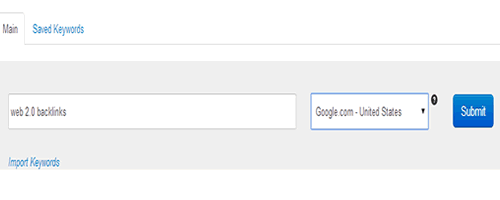
Now you will have a whole load of potential keywords based on your niche. Pick one that you like the look of and hit the evaluate button.

I like the look of “Web 2.0 Backlinks”, the evaluate button will let us know how difficult it is to rank for this keyword.

The keyword difficulty is 15, which is extremely low and is therefore ideal for this ranking tutorial.
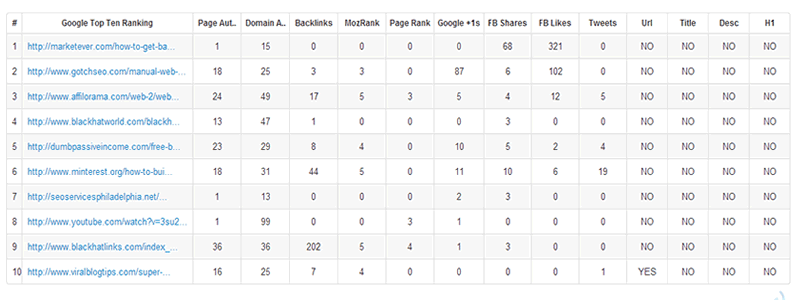
As you can see, Keyword Revealer analyses the top ten ranking websites in Google for your selected keyword.
Not one of the top ten sites has the keyword in the Title, Description or H1 tags. Also, page authority is low, as is the number of backlinks to the top-ranking sites.
I am certain that aged Web 2.0 backlinks with high page authority will rank my site number one on Google for the keyword “Web 2.0 Backlinks”.
You should also work out how much money your keyword is worth in monetary terms. There are no point building backlinks for 3 months to hit the top spot only to earn $3 a month from it.
How easy was that?
Now we have a super easy keyword that we are confident we can rank number one for. The Web 2.0 backlinks strategy works for Keyword Difficulty 30 and below. It will even work for harder keywords, but I have not tested that.
Before we start building backlinks we need to make sure our content is fully optimized to beat the competition.
You will find below details of how you need to optimize your money site content. This has to be done before you start to build backlinks.
How To Optimize Your Content
Backlinks are a highly important ranking factor, however, we need to make sure our content is optimized first.
Keyword Revealer has given us some big tips on how to optimize our content.
This is what needs to be done:
- Make sure your content is focused around a particular keyword. Mention the keyword in the top, middle and bottom of your content. Do not overdo Keyword density, I am always around or below 1%. This post is 0.6%.
- Top ranking sites have long content posts. Make sure your content is in-depth and around or more than 2000 words long.
- Put images in your content. One image should have your keyword in the ALT tag.
- Put your keyword in your main (H1) heading.
- Have your exact keyword in your URL extension.
- Put the keyword in the Title and Description Tags.
- Have at least one outbound link to an authority site in your niche. (Do not link to a competitor for your keyword)
I always do some internal links to my new content. Go through the rest of the content on your site and link to your new content if related words appear in the text. I sometimes add to existing posts to get an internal link to my new content.
That’s it. Stick to these six simple steps and you will certainly rank number one in the search engines with the powerful Web 2.0 backlinks we are now going to build.
How to Create Web 2.0 Backlinks
Now it is time to build the powerful Web 2.0 Backlinks to our awesome highly optimized content.
The key is to use aged high page authority Web 2.0 sites. You can use new Web 2.0 sites, this takes a lot longer because you will need to power them up with backlinks.
The fastest way to rank in Google is to buy aged Web 2.0 sites. Scraping them yourself takes time.
Some people just use Tumblr blogs, I like to use a mix. You can buy aged Web 2.0 sites really cheap. You can use them to rank more than one site, they are great value for money.
Try one of the guys below to get started. The lower the keyword difficulty the less Web 2.0 backlinks you are going to require to rank number one in Google.
What you need:
Our service will get you expired Tumblr blogs with at least 10 backlinks pointing to them. The blogs are registered for you. The service is here in the Rankers Paradise SEO store.
$40 will get you 50 expired Tumblr blogs with PA 29+. Again, they are registered for you. The service is here.
Now for the social signals. You can use this service to get 10,000 social signals for just $20.
So basically, with the use of rankersparadise.com, you can rank a website no.1 for less than $100.
What I used to rank this post:
For just $15 I got 5 high page authority Weebly and 5 high page authority Tumblr blogs from here. The best part is that the backlinks are done for you, they have a PA 28+. The service uses aged blogs and they are indexed.
I used the 10,000 social signals service as mentioned above.
I always get my team to find the expired Weebly and Tumblr blogs for me. This saves me loads of time, it’s worth it with them being so cheap.
While I wait for my order to be completed I get on with writing the content.
Because the keyword selected for this post has an extremely low keyword difficulty score of 15, I am going to use just 10 web 2.0 backlinks.
5 high page authority Tumblrs and 5 high page authority expired Weeblys combined with 4000 social signals to this page will easily be enough to rank it.
If 10 Web 2.0 backlinks do not rank this page number one for my selected keywords, I will simply add more backlinks using web 2s until I rank first.
This process is super simple.
How To Build Your Backlinks
It is very important that you read this part on how to build your Web 2.0 backlinks in the right way. You do not want to have your keyword in the backlink anchor text every time.
Each time you create a backlink from your Web 2.0 sites, you need to think about the text that is used inside the link.
This is what works really well for me:
- Keyword
- URL
- Click Here
- Brand
So your first backlink from a Web 2.0 site will contain your keyword in the anchor text.
Your second lot of content on your second Web 2.0 will use your money site URL for the anchor text.
The third Web 2.0 backlink will have “click here” as the anchor text. Your fourth Web 2.0 backlink will use your brand name as the anchor text.
On your fifth Web 2.0, you will go back to the beginning of the process and use your keyword as the anchor text and so on and so forth until you have used all your Web 2 sites.
Sometimes I do not bother with the branded anchor text if I am not going to create many backlinks. I will not use the branded anchor text in this tutorial as I am only going to create 10 Web 2.0 backlinks.
Remember you are trying to make your backlink profile look as natural as possible. Do not miss this step.
I always log all my Web 2.0 backlinks in an Excel file. I note down the Web 2.0 backlink URL, the anchor text used and the date it was published.
How To Get Backlinks From Tumblr Web 2.0
Now that you have your expired high page authority Web 2.0 sites, it is time to get some backlinks from them.
We will start with Tumblr because they are quick and easy to do. You do not need to add a lot of content to each post. I like to add around 200 words, you can do less if you are pushed for time.
Tumblr has recently started to do a redirect, which might just kill your backlink juice. If you put a small description of your blog post in the Tumblr Site Description, you will get a backlink to your site without the redirect. I will show you how to do this below.

First of all, log in to your Tumblr account with the email address and password that we provide you with.

Click on the pencil icon in the top right corner of the screen to add your first post.

Now click on the Text icon. Don’t worry, you can add links, videos and other media too.
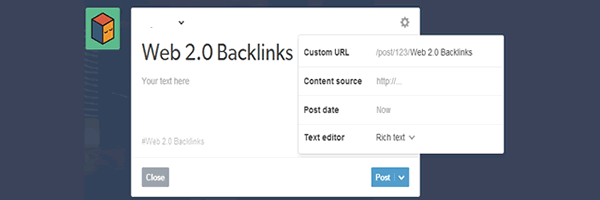
Use your keywords that you want to rank for in the post Title, Custom URL (get to by clicking on the tools icon) and Tags.

Add your content (around 200 words will do), then highlight the text that you want to use as your anchor for your backlink. Now, select the link icon and then add the URL back to your money site.
You can also link out to another authority site in your niche. Just do not link out to a competitor that ranks in the top 10 search results for your selected keyword.

Now hit the post button, you now have your first powerful Web 2.0 backlink in place. We are not finished yet, we now have a Tumblr redirect backlink, now let’s get a direct backlink from Tumblr.
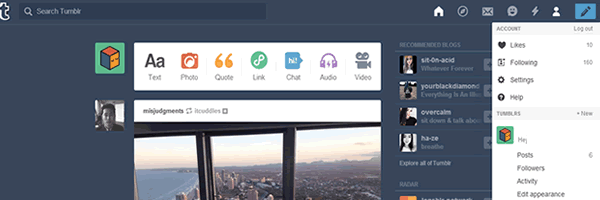
Click the person tab in the top right of your screen, then click on “edit appearance”.

Next, you need to click on the edit theme button.

You will need to add some basic HTML code into the description area to get your direct backlink from Tumblr.
I add a “Blog Posts” section to my site description area. So I will copy the first few lines of the content we created earlier that includes the link to our money site.
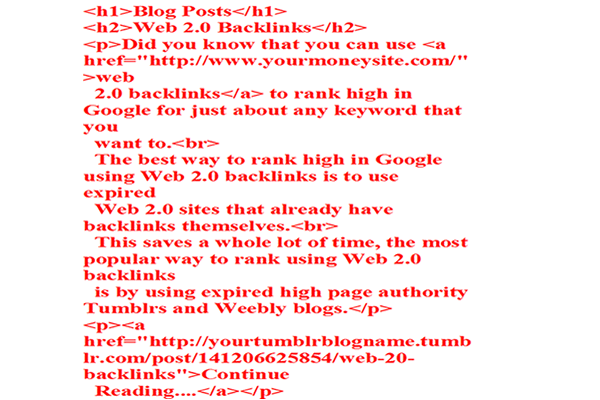
Now add the Html code to the description area. Your code will look something like above. Take a note of the link to your money site and Tumblr post.
You can copy and paste the code below:
<h1>Blog Posts</h1>
<h2>Your Blog Post Title (keyword)</h2><a href=”http://www.yourmoneysite.com/”>your anchor text</a>
<p><a href=”http://yourtumblrblogname.tumblr.com/your-blog-post-url”>Continue
Reading….</a></p>
Problems with code:
Some people have experienced problems with the code above.
Make sure that your quotation marks look like they do in the image above (the code in red).
Check that your quotation marks are facing the right way round 🙂 You can go here to copy a working code for HTML Links.
Add your content around the code.
After you have added the code, hit the save button on the top left of your screen. Then hit the exit button.
Now check out your Tumblr site. You will have a redirect link to your money site from a blog post, and a direct link from the description section at the top of your Tumblr site just underneath your blog icon.
That’s it. Repeat this process over and over again on all your different Tumblr blogs. You can use each blog over and over again to rank as many money sites as you wish.
Get Backlinks From Weebly Web 2.0
Let’s go right ahead and get some sweet backlinks from our high page authority Weebly Web 2.0 sites. I usually write around 300 to 500 words of content for my Weebly sites.
Always write unique content for your Web 2.0 sites as they are sure to get picked up by Google. This is by far the best way to go.

Enter your email address and password that we give you to log into your expired Weebly account.

Then select your Weebly theme. Make sure that you select a Blog Theme. This is important, you want all your posts to show on the high page authority home page. This means that all the backlinks you create from this Web 2.0 site will come from a high authority page.
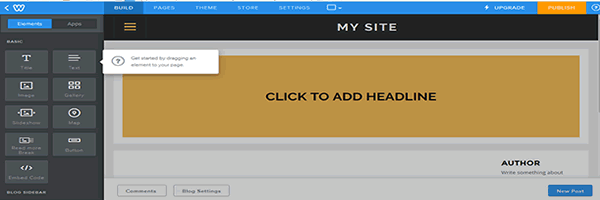
Click the “New Post” button at the bottom right-hand corner of the screen.
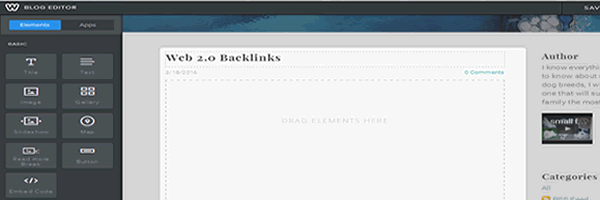
Add your post title, use your keyword as I have in the picture shown above. Then drag an element from the left-hand side panel into the content section. First I drag an image element across, and then a text element, which we will add our content to. Click in the text element area and write some content in there.
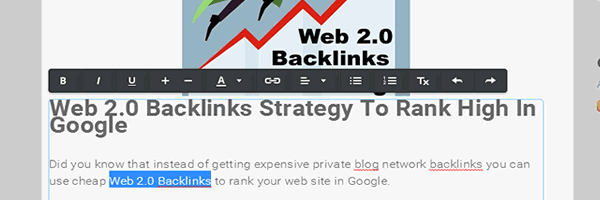
Highlight the text that you want to use as your anchor text in your backlink. Then click the link icon on the toolbar and enter the URL that you want the link to go to. I will add a link back to this page and also another link to an authority site in the Web 2.0 niche.
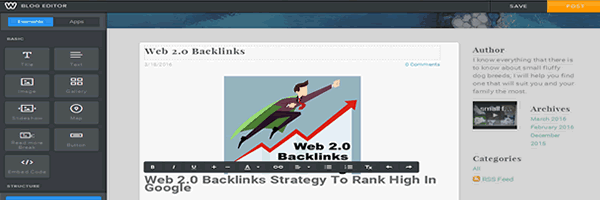
Click the “Post” button in the top right-hand corner of your screen, you will now have a live Weebly Web 2.0 backlink to your site.

Before you leave Weebly there is one last thing you need to do. By default, all Weebly sites are hidden from the search engines. Google will not find your backlink unless you cover this step.
Click the “settings tab” at the top of the screen. Then select “SEO” from the left-hand navbar. Scroll down until you see the “hide site from search engines” toggle. Toggle it to “off” and then hit the save button at the bottom left-hand corner of your screen.
That’s it. You can now go ahead and create Tumblr and Weebly Web 2.0 backlinks to rank any site you want to.
Your work is not finished yet. You need to get your backlinks indexed in Google search in order for them to improve your ranking.
Get Your Backlinks Indexed
The last step in the ranking process is to get all your Web 2.0 backlinks indexed in Google search. There are many ways to do this, my way is fast and easy.
I used to fire Social Bookmarks and social signals to my Web 2.0 sites in order to get the backlinks indexed by Google. This process took way too long, my new strategy is below.
UPDATE: I do not use Link Centaur any more, it is a waste of time. All you have to do is submit URL to Google search, all are outlined below.
Some expired web 2.0 sites just will not index, you can use the same content on a different web 2, it’s not the content, it’s the web 2 site subdomain itself. If the web 2 does not index after doing a Google submit it is not going to index. You need to bin that web 2 and move onto another one. Sometimes a Spam expired web 2 will not index at all.
To check if your web 2.0 site is indexed simply pop the full web 2 URL into Google search.
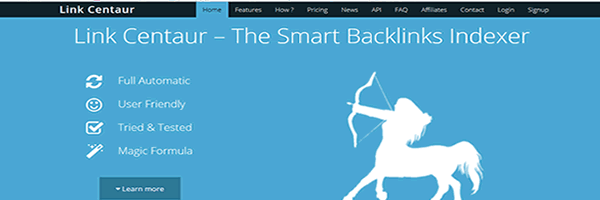
The first thing I do is add my Web 2.0 URLs to LinkCentaur.com. This site will get your backlinks indexed by Google. The best part is it is free to use. Well, on the free account you can add 50 URLs per day, perfect.

After you have confirmed your account click on the “Add a Campaign” button.

Add your campaign name. I always name each campaign by the keywords that I am looking to rank for. Then hit the “Save Campaign” button.

Now click on the “Details” button. This is where we will add our Web 2.0 URL to get our backlink indexed.

Now click on the “Add Links” tab and then enter your Web 2.0 URLs into the text area. Then click the “Add Links” button at the bottom of the screen.
Link Centaur does not guarantee that your Web 2.0 sites will get indexed. This is why I always add another step into the process. I will manually submit my Web 2.0 sites to Google, you need to visit the add URL to Google page to do this.
UPDATE (2019) – You can’t index your web 2.0 backlinks using Google search console in 2019.
The good news is that I have done a post on how to index backlinks in minutes really fast in Google.
You use Google Tools to force a Google spider to crawl the websites where your backlinks exist.

Simply enter your Web 2.0 URL and hit the “Submit Request” button. If your content is unique, it is sure to hit the Google index. Sometimes my Web 2.0 sites get indexed in the Google search results within minutes of pressing the submit button.
There you have it, a complete ranking strategy. Follow this process to the letter and you will be ranking sites high in Google in no time at all.
**UPDATE 2019**
You can’t index backlinks using Google console anymore.
Make sure you register expired Weebly and Tumblr blogs that are already indexed.
This will save you time in the future.
You can see how to find these for free without software here.
You can also index the links by doing Tier 2 links on social media.
Simply drop the links on Facebook, Twitter, Reddit and they will index.
It takes a little longer but is worth doing in the long run.
When Will You See The Results
This is different for every site that I have ranked. I normally see some search engine movement with this technique within a week or so.
To rank a new page from scratch at number one in Google using this system it can take 2 or 3 months. Don’t worry if you don’t see instant results, just keep building the backlinks and you will most definitely improve your ranking.
The important thing to do is not to quit. Don’t build two backlinks and stop, keep going with them until you reach number one. This process does work, I have used it over and over again.
What I Have Achieved With This System
I used just 10 high page authority expired Web 2.0 backlinks to rank number one in Google search. This was for my dog breeds site, my chosen keyword has a difficulty score of 20 on the Keyword Revealer site.
I used just 28 Web 2.0 backlinks to rank number one in Google for another dog breeds keyword. This keyword gets over 2000 searches per month, it has a Keyword Revealer difficulty score of 20.
I have ranked so many other sites using this system. It takes a little work, but it is well worth doing if you pick the right keywords to focus your time on.
The Results
I will log the ranking results here. I will keep track of when each backlink is created and post the dates here for all to see.
A good piece of free software to use to track your ranking is called “Rank Tracker” by SEO Power Suite. I use this all the time, this software will analyze keyword difficulty for you, worth knowing for when you run out of free daily Keyword Revealer tries.
The day the post is published:
This post was published on Friday 18/03/2016. Google ranking: N/A. Zero backlinks created.
After submitting this post to “Google add URL” in less than 30 minutes after the post was published the post is indexed in Google search. Google.com ranking is: 41 and Google.co.uk ranking is: 49. This is with zero backlinks created.
Sunday, March 20th, 2016:
Added 1 Tumblr and 1 Weebly backlink. Google.com’s ranking is: 22 and Google.co.uk ranking is: 25. That’s a whopping improvement of 19 places on Google.com and 24 places on Google.co.uk. Lot’s of movement in just 2 days with just 2 backlinks created.
Monday, March 21st, 2016:
Added 4 Tumblr Web 2.0 Backlinks. No change to ranking.
Tuesday, March 22nd, 2016:
Added 4 Weebly backlinks. Now we have a total of 10 Web 2.0 backlinks pointing to this page. Google.com ranking is: 23 and Google.co.uk ranking is: 26. A ranking drop of 1, this is only natural. I always see a small drop in ranking before a big rise. When the social signals kick in we will get a big improvement in ranking.
So far I have 4 Weebly and 4 Tumblr Web 2.0 backlinks indexed in Google search. For some reason 1 Weebly and 1 Tumblr did not index. I will create another Weebly and Tumblr post so that we have ten backlinks indexed.
I have added one extra Tumblr and one extra Weebly. Both of these backlinks have been indexed. We now have ten backlinks from web 2.0 sites indexed. Let’s wait to see how this affects the rankings.
Tuesday, March 29th, 2016:
2350 mixed social signals added. This page has dropped from the Google index altogether. This is because it is a new site and I built backlinks to it too quickly. The page will sit in the Google sandbox for a little time and will eventually return to the index. This is only natural for a new site like this.
Thursday, March 31st, 2016:
This page is now back in the Google search result pages. On Google.com it’s ranked: 24 and on Google.co.uk it’s ranked: 26. It will probably remain in that position for a while, if it does I will add some more web 2.0 backlinks.
Saturday, April 9th, 2016:
Ranking update: Google.com: 20, Google.co.uk: 20. The ranking is now climbing, not added any more backlinks. Still climbing with the original 10 high page authority Weebly and Tumblr backlinks. This goes to prove, ranking any site is a long term project and takes time, patience is required, the results do come. This method never fails.
Sunday, April 17th, 2016:
Ranking update: Google.com: 8, Google.co.uk: 8. The ranking has improved significantly by 12 places in just one week. I have not added any extra backlinks. This ranking has been achieved with just 5 Weebly and 5 Tumblr backlinks and some social signals. I am sure the ranking will continue to rise. When it settles in a particular spot I will add more backlinks until no.1 rank is attained, however, this might not be required.
Monday, April 18th, 2016: One Month Ranking Update
This page has been live for exactly one month now. We have gone from zero to Google rank 8 in just one month. We are on the first page of Google with just 10 Web 2.0 backlinks.
Wednesday, April 27th, 2016:
The search engine movement has leveled off. I have added some of these free backlinks to power up the page. If ranking does not improve I will add more high page authority web 2.0 backlinks.
Sunday, May 1st, 2016:
In just 4 days, the free backlinks that I added have improved the ranking of this page. Google.com: 6 and Google.co.uk: 7. That’s a two-place ranking rise on Google.com and a one-place rise for Google.co.uk. I am sure those free backlinks will continue to improve the ranking of this page over the next few weeks.
Wednesday, May 4th, 2016:
Today I have added 8 more high page authority Tumblr backlinks. The current rank is Google.com: 6 and Google.co.uk: 7. Let’s see how these web 2.0 backlinks take effect over the next few weeks.
Friday, May 6th, 2016:
I have added 7 more Tumblr posts with backlinks included. The ranking has not changed since May 4th.
Sunday, May 15th, 2016:
Google.com: 3 and Google.co.uk: 3. Now ranked in position no. 3 on Google search. The page now has a total of 5 Weebly and 20 Tumblr expired web 2 blogs pointing at it. Give this a few more weeks and no. 1 ranking will be achieved. This has taken nearly 2 months to achieve. Ranking no. 1 usually takes around 3 months to do, so I am on track here.
Sunday, June 5th, 2016:
This page is now ranked at Google.com: 2 and Google.co.uk 2. Just one more place to go and we have hit the top spot.
I have not added any more backlinks since my last ranking report.
Thursday, June 9th, 2016: No. 1 Ranking Achieved
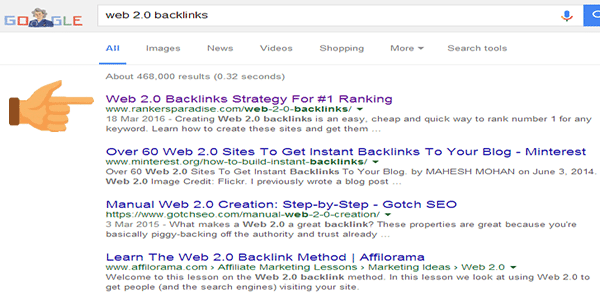
Today this page hit the no. 1 spot in Google search. So how long has it taken to rank this page no. 1 with just web 2.0 backlinks?
Took exactly 83 days to rank no. 1 in Google search UK and USA. Just under 3 months.
How many expired web 2 sites did I use?
5 Weebly and 20 Tumblr blogs. That’s all it took, it’s just a game of patience and building the backlinks at a steady rate. Now it is your turn to go ahead and Rank no. 1.

Web 2.0 Backlinks Ranking Schedule
Below is the exact schedule I used to rank this page no. 1 in Google search.

As you can see, you start off slowly building the web 2.0 backlinks at a steady rate.

After the end of your first week, you should be ranked close to or at the bottom of page 1.

Ranking no. 1 will take you 3 months with this strategy. Slow and steady always wins the race with SEO.
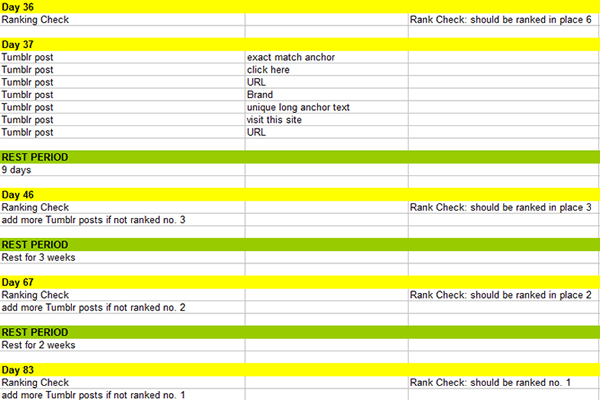
Not every strategy will be the same, but you can use this as a loose guide to how it is done.
Of course, high competition keywords will require more backlinks in this time to rank at the top spot.
This is what needs to be done:
Month 1: 5 Weebly and 5 Tumblr Posts. All done on different Tumblr/Weebly subdomains. Add 2350 social signals.
Rank check at end of month one; should be at bottom of Google page one or top of page two.
Month 2: New web 2.0 link wheel (not expired web 2s). See my free backlinks page for information on how to do this.
Rank check at end of month two; should be ranked number 3 or 4.
Month 3: 15 Tumblr posts. All done on different Tumblr sub domain properties.
Rank check at end of month three; should be ranked number 1.
To use the exact same strategy I have used here just click on the links below. The results are here for you to see, if you use this system you will rank number one on Google search.
Rank Using This Exact Strategy
Month 1:
4000 Social Signals
4000 Social Signals: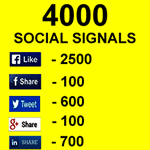
First of all, you are going to require some high-quality social signals.
You can get these from the Rankers Paradise SEO Store.
We offer 4000 social signals from the most powerful social media platforms on the planet.
You will get backlinks from Facebook, Twitter, Google Plus and LinkedIn.
This is the best way to get your ranking campaign started.
Nothing looks more natural than a mass of social signals before the backlinks start to flow.
High PA 5 Weebly and 5 Tumblr Backlinks
High PA 5 Weebly 5 Tumblr Backlinks:
You have two options here.
You can have the high PA 5 Weebly and 5 Tumblr backlinks done for you, or you can do them yourself.
If you choose to do them yourself you are going to need those 10 powerful blogs registered for you, this can be done here.
Or you can get the backlinks done for you the right way, with the content fully optimized for you to rank up for your selected keyword.
Month 2:
10 Site Two Tier Web 2.0 Link Wheel
10 Site Two-Tier Link Wheel:
The second month of my web 2 ranking strategy uses a powerful link wheel.
You can read how powerful the web 2.0 link wheel is right here. I ranked page 1 in 1 day using this exact strategy.
Month 2 uses 10 web 2.0 sites, 5 sites on tier 1 and 5 sites on tier 2.
Remember to index the links slow and steady through the second 30-day cycle and you are sure to hit page 1.
Month 3:
15 High PA Tumblr Backlinks
15 High PA Tumblr Backlinks:
For the final push to the top spot, you will require 15 high page authority Tumblr backlinks.
All Tumblr blogs will have backlinks pointing to them, the rank juice will flow down to your money site.
I have used this service over and over myself, it works.
Make sure you mix up your anchor text as I have done so and you will hit top rank.
What do I do if I am not in the top spot after 3 months?
If you are not in the top spot you need to keep the backlinks flowing at a steady rate.
You can continue to use web 2 platforms for backlinks using the following service.
Month 4:
Premium Web 2.0 Link Wheel
Premium web 2.0 backlinks:
This service alone can get you to the top.
I ranked on the top of my page of Google search using this exact strategy alone in around 30 days.
If you fail to hit the top spot then the following strategy is very powerful at pushing ranks.
The service hits your site with 5 brand new web 2 sites all with your exact keyword in the subdomain URL.
Each of the 5 tier 1 new web 2.0 sites are linked together into a link wheel formation.
The magic happens with the tier 2 backlinks.
Each of the 5 tier 1 web 2.0 sites get 10 tier 2 high PA Tumblr backlinks fired at them.
All that lovely ranking juice flows down to your money site.
This is a sure-fire way to get your site to the top.
How To Find Expired Tumblr Blogs With Backlinks For Free No Proxies No VPN Required
You are going to love me for this;
You are never going to have to pay for expired Tumblr blogs again.
You can now find expired Tumblr blogs without Gscraper or Scrapebox.
I have discovered free software that you can download to find niche relevant expired Tumblr blogs with backlinks.
I have used this software and it really does work. You can thank me in the comments 🙂
The software is called Expired Tumblr Hunter (no longer free – link removed). Follow the link to get your free copy.
See my blog post on how to find an expired web 2.0 manual for free (includes all web 2.0 platforms, not just Tumblr).
This is how to use the software to find good quality expired Tumblr blogs that will help you rank.

After downloading the free software open it up. You can find niche related expired Tumblr blogs by selecting the “Niche related” tab. Then you will need to enter your keywords.
This software is so good because you do not need any proxies or VPN.
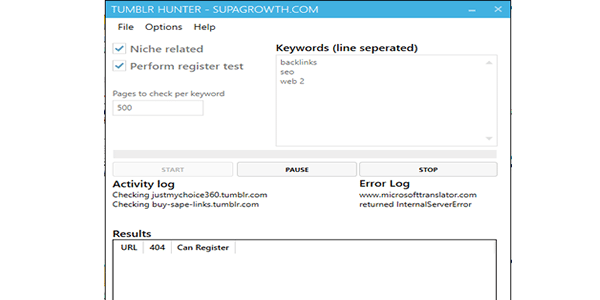
Input your niche keywords and then hit the “start” button.
You do not have to search for niche related expired Tumblr blogs if you do not want to.
Do not select the “Niche related” tab if you do not require niche related Tumblr blogs. Just open the software and hit the start button.

After a couple of minutes, I get a list of expired Tumblr blogs ready to register.
The software even lets you know if Tumblr is available to register or not.

When you have a good list of expired Tumblr blogs we need to check the backlinks pointing to them. We need to make sure that they are worth registering.
A Tumblr without any backlinks is worthless to us, it will not pass on a great deal of ranking juice.
Select a Tumblr that is available to register and right-click on the URL and copy it.
We are going to paste the URL into a few free backlink checker tools to analyze the backlinks.
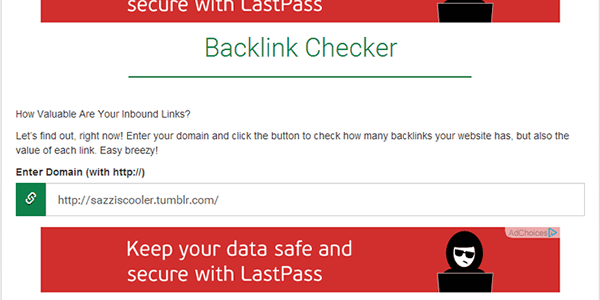
Paste the Tumblr URL into this free backlink checker tool. I use this one because it finds the most amount of backlinks.
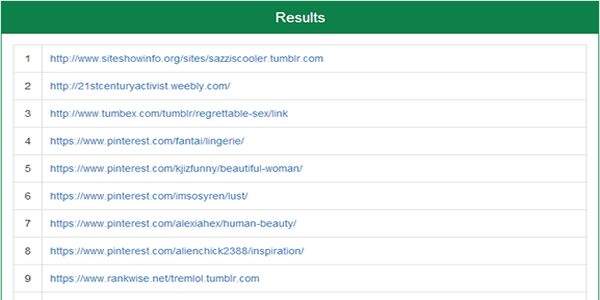
Take a look at the backlinks pointing to your expired Tumblr. This one has lots of Pinterest and other Web 2 backlinks. It’s not the strongest Tumblr ever, so I would not register this one.
We are looking for an expired Tumblr with lots of backlinks from good authority domains.
To check the authority of the backlinks pointing to the Tumblr blog just visit the URL and use MozBar.

Use MozBar to check the quality of the backlinks pointing to Tumblr.
As you can see, this one is poor. We are looking for backlinks to the Tumblr from pages with high PA with backlinks pointing to them too. This will pass on some serious ranking juice.
Now let’s check if the backlinks that point to the Tumblr still exist.
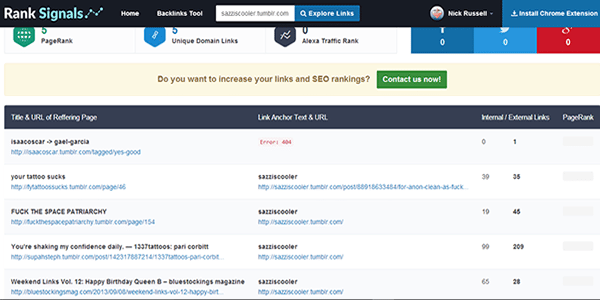
Now paste the URL into the RankSignals.com backlink checker tool. It is free to use, however you do need to sign up for an account.
This tool lets us know if the backlinks pointing to Tumblr still exist. If the backlinks have been removed then there will be no ranking juice passed onto our money site.
That’s it. Go and get the tool and find yourself some expired Tumblr blogs with loads of backlinks for free.
You have no excuses for not ranking sites no. 1 now.
Just take your time finding a Tumblr with some decent backlinks. It will pay off big time if you do.
I just found an expired Tumblr using the Expired Tumblr Hunter software that has a backlink from a PA 65 with 9000 backlinks pointing to it. This particular Tumblr has 6 more strong backlinks pointing to it. This is some serious ranking juice that I got for free, wahooo.
How To Register Expired Web 2 Tumblr Blogs
This is a quick tutorial on how to register expired Tumblr blogs. Sometimes when you buy expired Web 2.0 sites you need to register them yourself.
This is how you do it:
First of all sign up for a free email address. I use mail.com or Yahoo.
You can register all expired Tumbly blogs under 1 email address if you like.
I like to use a new email address for every Tumblr blog. This way, if one gets shut down, you do not lose them all.
You can mask your IP address when you register them, you can use a free IP masking service. I do not do this, if you are concerned about footprints then you might want to do this.

Click on the “Get Started” button.

Add the email address that you just signed up for. Add your password. Now, for the username use the name of the expired Tumblr blog that you were given. So in my case here it was happyprincekoala.tumblr.com. Then hit the signup button.

Now enter your age and accept the terms of service. Click the “Next” button.
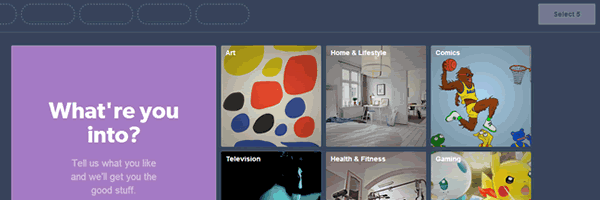
Then select 5 things that you are into and hit the next button.

Then you need to go ahead and verify your Tumblr email address that you used on sign up.

You have now verified your email. Now go to your Tumblr dashboard. You can visit your Tumblr site URL to check you are up and running. Now you can add some content to your new expired Tumblr blog and get those Web 2.0 backlinks to your money site.
If you want to register an expired Tumblr URL to an existing account do the following:

From your dashboard click on the little person icon in the top right of the screen. Then click on “+New”.

Pop in your blog title and enter the URL of the expired high page authority Tumblr blog. Then click “Create Blog” and you are done. It’s fast and easy to add an expired Tumblr blog to an existing account.

Every now and again someone will beat you to registering the expired Tumblr blog. This is what you will see if this happens. I know it’s annoying, but it does happen.
Most sellers of expired Tumblr blogs will replace them if they have already been registered by someone else before you get there. The guy that sells them for $1, as featured above, will replace them if you get back to him before 3 days after the order was delivered.
Now you have the Tumblr registered it’s time to get your powerful Web 2.0 backlinks and start ranking.
You can discover how to remove the redirect in Tumblr backlinks here.
Hey i’m bulding one web 2.0 everyday (have some awesome tumblr blogs with pa35+ and with over 1k external backlinks hehe) and i have some questions.
1) what about the set up of the web 2.0 blogs? only 1 short post with picture/video + 200 words + one backlinks to money site + one backlink to wikipedia or so?
because i heard about super web 2.0 blog with many filler posts and one longer post (about 500 words) with only one backlink to the moneysite. and only 2 backlinks to the money site per 1 tumblr blog…i am confused now…
2) social signals. just bought 2350 signals for 3$ like you. and they need a description and keywords. how are you doing this? exact keyword and long discription…? please help me 🙂
3) is it ok to build one web 2.0 every day? my site is not so old (about 3 months) and already on page 1 and 2 for most of my keywords (used theHOTH for some web 2.0 blogs and some blog commenting).
thanks for your held 🙂
i noticed something recently, when i add tumblrs , my rank depreciates badly from 12 to 75 now, and few other keywords loss 1 or 2 positions
Hi Nick,
I return to your blog off and on not only to read your detailed helpful posts, which are awesome by the way, but also to read the replies at the end where you explain to everyone in detail about the problems they are facing and discuss relevant points so that everyone can benefit from them. I have got so much from your blog that I feel it would have been much better had I stumbled onto your blog much earlier!
I just would like to know if I can use the same email account to register all 10 or 20 tumblr sites, because I can neither afford a private internet access or VPN to avoid footprints. Besides, I have heard that if you open accounts with same email ids , all the tumblr web2.0 s will be banned after a few days and your links will evaporate as well. Your thoughts on this.
Personally, I wouldn’t do anymore than 3 blogs to an email. Like Nick said, if the email gets banned you’ll lose all of that progress which can be a pain in the rear to re-create.
You can buy a crapload of mail.ru emails off Fiverr pretty cheap that work great for registering web 2.0s. I bought 700 for $5 a while ago and only used about 10 of them so far. Works a treat.
Hi Nick,
I left you an email regarding a question but I don’t know if you received it or not but I’ll throw it here too so everyone can also see it if they have the same question.
If we were to further power up the links with a tier 2 & 3, should we be powering up the main url page of the tumblr account or should it be the individual post url?
For example,
should we be adding tiers to abcde.tumblr.com or abcde.tumblr.com/post/1234(the post where the backlink is)
I actually do both, but it’s rather methodical.
I dedicate web 2.0s to broad niches (i.e. 50 Tumblrs for weight loss, 50 for home goods, 50 for electronics, etc) rather than posting a bunch of links to varying niches on each one.
So when I go to juice up my web 2.0s I send PBN posts, bookmarks, other web 2.0s, etc as backlinks to them with the blog URL as anchors, as well as mix in some generic niche terms. So if I were doing weight loss, for example, I’d have a small portion of the anchors for my web 2.0s main url be like “great blog about weight loss”, “inspiring weight loss journey”, “awesome healthy living blog”, etc.
And then I also send PBN posts, bookmarks, etc to my actual post URLs as well. This is mostly URLs, generics (click here, this, source, etc), and also a few long-tails related to the keyword I’m trying to rank for that specific submission.
I’ve done this quite successfully in the past. And I’ve actually got web 2.0s that I created from scratch (brand new registered ones) that are now PA 40-50 from doing that. And I’m ranking on page 1 for some moderately difficult keywords – even out ranking some big authority sites.
It’s not always necessary to boost your web 2.0s, but I find that as long as you do it intelligently – it never hurts.
Fantastic blog you have here but I was curious if you
knew of any message boards that cover the same topics discussed here?
I’d really love to be a part of online community where I can get responses from other
knowledgeable individuals that share the same interest.
If you have any recommendations, please let me know. Bless
you!
There was one years ago, but it’s not around anymore. Most of the major ones (DigitalPoint, Warrior Forum, etc) aren’t worth your time. There’s a lot of junk info and complete garbage there. There are FB groups that are helpful. But not much else.
Just got some tumblr blogs with backlinks…so one of them has over 2k external backlinks and 98% of the anchor text is the name of the blog (the domain without .tumblr.com). sooooooo thats pretty spammy and back i think?
What do you think?
Awesome to see all the new comments on here.
Just wanted to drop by and note a few things.
1. The Moz bar (as of today) is working again for checking Tumblr PAs.
2. A few days back I hit page 1 for one of my keywords using this strategy. Only at #10 so far and it does bounce to #11 or #12 here and there, but keeps coming back to #10. This has been about 3 weeks after my Tumblr links were indexed.
3. If you’re looking to mask your IP for registering Tumblrs I highly recommend using Private Internet Access (PIN). I’ve used it for months and it’s only like $7/mo and works a treat.
I’m currently scraping more Tumblrs and building backlinks to other pages. I’ll report back if I see anything significant worth giving an update on.
Just wanted to let people know that this does work, but it doesn’t happen overnight. The content creation is the biggest thing, honestly. But if you just sit down and focus you can get it done.
Moz bar for Firefox? Cause mine is not working. Am using it on crome only which is not convinent for me
I’m referring to Chrome. I use Chrome as my primary browser. I use Firefox (with CCleaner and such) for backlink building, but I use Mozbar on Chrome to check out the Tumblrs I scrape.
Do I need to vary my anchor text with brand, naked url, click here etc if I am NOT targeting the main keywords of that page but rather other long tail keywords with much lower search volume?
For example if my main keyword is web 2.0 backlinks, but I’d like to target other keywords that were ranking, like free backlinks, web 2.0 link wheel, expired web 2.0 sites etc, can I just use those keywords as anchor text?
And now one of my keyword went from 12 to 47 since 2days ago. Seo can be frustrating a times
lol, what could be wrong with my site ? i used to get 18 to 25 visits a day recently, but yesterday and today it dropped weirdly to 2 visits only and some pages are at 2nd page now. am very very annoyed.
so far i have 42 tumblrs and 5 weeblys pointing to my site and 37 more tumblrs to go , probably will add more than that if need be. i dont know what could be the problem of my traffic
Hi Nick,
The keywords that I was targetting have now disappeared from google search results after some good progress. One of them moved from no. 61 to 30 last week. Is this normal or have i just been penalised by Google.
I have used 10 tumblrs and I bought one of the fiver gigs that you mentioned in one of your blogs and everything went on well until this week. Please advise.
I had this happen to one of my pages today. I have seen it happen in the past, though. Most of the time it does come back. Sometimes within 24 hours. Sometimes a week later. And, yeah, it usually comes back stronger than before. Just gotta wait it out and keep trucking along.
Yes checking in google.com with serplab but will try rank tracker . another keyword just jumped from position 81 – 20th position, and am happy for this. Well since tumblr is free , I think I can outrank people with 50 pbn using 200 expired tumblrs ? What you think, thanks
It’s awesome to pay a quick visit to this site and reading the views in
all the comments concerning this web 2 backlinks ranking strategy, I am eager of getting experience in SEO so a big thank you. You have helped me a great deal. It’s good to see people are sharing their results here, it is a big help to know that it works. I will give it a go now. 🙂
Thanks for web 2.0 links, this is my website – web-design-chennai.in I’m building some web 2.0 backlinks for my site. thanks…………………………….
when you post a tumblr blog and index it, how long before you see improvements?
my money site posts that serplab says are ranking in position 15-20 are not there when i check on google, and not even in top 100, any idea whats wrong?
i have build over 35 tumblrs and weebly for a keyword difficulty of 19 and below and my site is 1 month and 6 days plus social signals and 10 pbn posts, with few comments and diversity , the best so far are 2 posts ranking at 18 and 17 which i dont see in google search when i search.
Hi Nick,
Great post! I got a question, I’m building some web 2.0 backlinks for my site.
Is it ok, if the expired web 2.0 like tumblr is not relevant to my site or not the same niche to my site?
Thank you.
Hey Nick! Another question.
As far as using tumblr and weebly to produce content for backlinks, should we be making it as humanly natural as possible? Or do they just need to have content to avoid being “inactive” and flagged for removal?
After finding expired 2.0s, what do you think is better to do as far as productivity and saving time
A) Spend time to make the blog look like a real person (multiple filler post, profile photo, background, bio, scheduled post) while adding your articles/backlinks every few posts
or
B) Don’t bother, just post your unique content + backlink and post once a month to avoid inactivity
I’ve been doing option A but it gets kind of time consuming. Your guide sort of seems like option B and some gigs on fiverr (the 5/5 tumblr/weebly you recommended) seems to do option B as well so I just wanted your opinion.
Thanks
Thanks for sharing your info. I truly appreciate your efforts and I will
be waiting for your next post thanks once again.
I have recently started a blog, the info you offer on this site has helped me greatly. Thanks for all of your time & work.
Hey Nick,
Thanks for helping me with the description portion as I finally got it fixed. I just have another question.
I think I stumbled across a goldmine on finding my own expired tumblr account that has an extremely high PR and ridiculous amount of backlinks and I have a stupid question. Once you register the account, it’s obvious going to be blank and empty right?
Only reason I asked is because all the expired accounts i purchased usually has content so I don’t know if it’s existing from the previous blogger or if the person who sold it added links in the past and let it age.