
I see it every single day. People jump onto WordPress.com, smash out a post with 5-10 links to their money site, and then come crying to me when their account gets nuked 24 hours later. It’s a complete waste of time. Look, I’ve been building these link networks for years, and I’ve tested every configuration under the sun. You don’t need to be a coding genius, but you do need to stop acting like a bot. If you follow this guide, you’ll know exactly how to set up a WordPress.com sub-domain for SEO tier 2 linking without getting flagged. I’m going to show you the setup that sticks and actually moves the needle in the SERPs.
Most people treat WordPress like a “link dump.” They sign up, drop five links in a single post, and then wonder why their account is gone 24 hours later. Google’s algorithms are smarter than that—they look for signs of life. If you want a Tier 2 link that actually sticks, gets indexed, and passes real authority, you have to treat it like a real website.
Here is the exact step-by-step strategy to set up a WordPress.com sub-domain for SEO tier 2 linking without getting flagged.
1. Build a “Human” Foundation
Before you even think about dropping a backlink, you need to establish “trust” with the platform’s automated filters.
-
Choose a Niche-Relevant Sub-domain: Don’t use
linkbuilder99.wordpress.com. Use something that sounds like a real blog, such asmarketinginsightsblog.wordpress.comorhomeofficeproductivity.wordpress.com. -
The Profile: Complete the “About” section. Add a profile picture (Gravatar). A blank profile is a massive red flag.
-
The “No-Link” Phase: Do not include your Tier 1 link in your first post. Publish at least three high-quality, niche-related articles over the course of a week. This establishes the site as a “real” blog in the eyes of the platform.
2. The Golden Rules of Link Placement
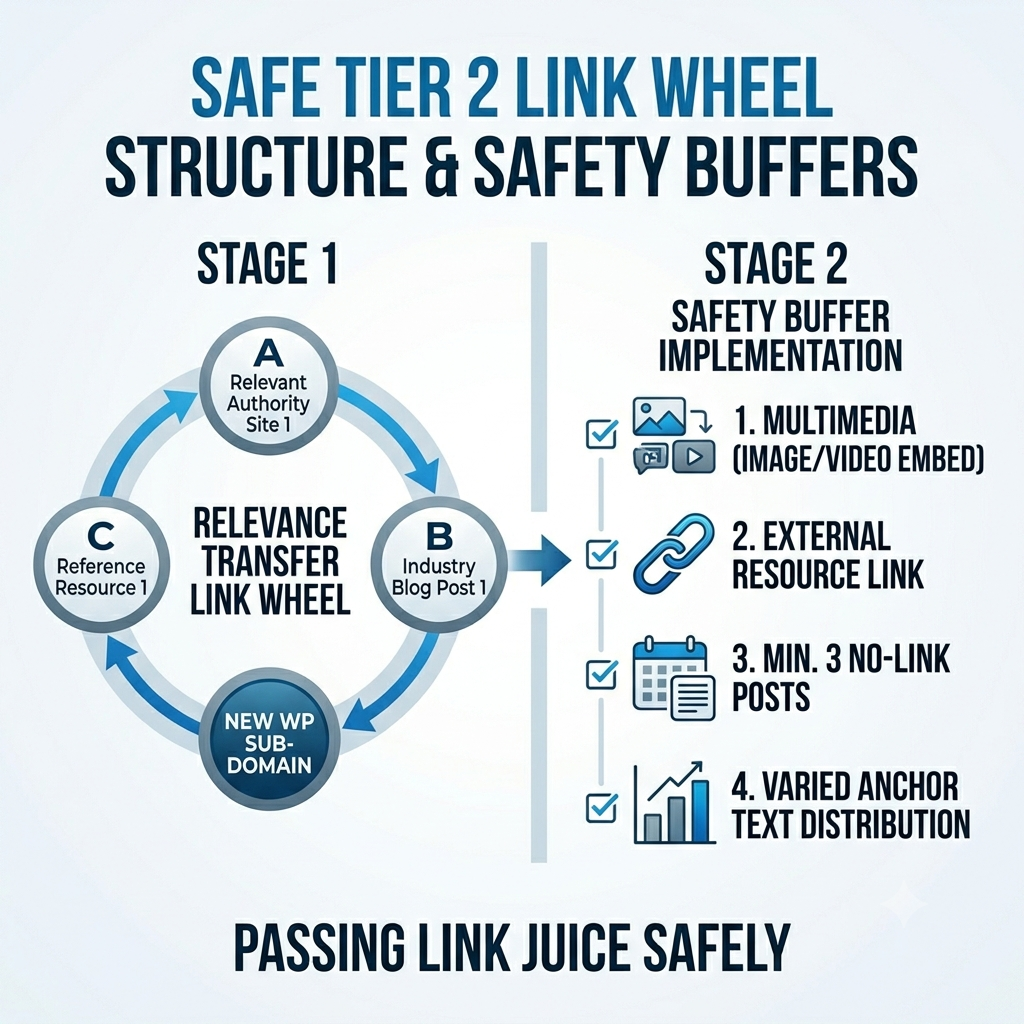
When you are finally ready to insert your Tier 2 backlink, follow this safety checklist. This is how you stay under the radar.
| Setting | Recommendation for Safety |
| Post Length | Aim for 600–800 words. |
| Link Ratio | 1:1 rule. Link to your Tier 1 site AND one high-authority site (e.g., Wikipedia). |
| Frequency | Post new content at least 3 days apart. |
| Media | Embed at least one relevant image or YouTube video per post. |
3. Mastering the Anchor Text
Google hates over-optimization. If every single backlink you build uses your exact target keyword as the anchor text, you are begging for a penalty.
To keep your Tier 2 links natural, use the following distribution:
-
40% URL/Branded: Use your website’s URL or brand name (e.g.,
yourdomain.com). -
40% Generic/Long-tail: Use terms like “click here,” “read this guide,” or “find out more.”
-
20% Exact Match: This is where you use your primary keyword.
Pro Tip: Only use your exact keyword anchor text once for every five links you build. If your content is well-optimized, this is more than enough to move the needle.
4. Technical Checklist for Longevity
Before you hit “Publish,” verify these four things to ensure your post stays live:
-
Unique Titles: Ensure your H1 title is descriptive and unique. Avoid keyword stuffing.
-
Internal Links: Link to your other (previously published) posts on the same WordPress.com sub-domain. This keeps Googlebot crawling your property.
-
Media-Rich Content: Embed a relevant YouTube video. It increases “time on page” metrics and shows Google that your page is a multimedia resource.
-
No Excessive Linking: Never have more than two outgoing links per post.
5. How to Get Your Links Indexed
A backlink that isn’t indexed is a backlink that doesn’t exist. If Googlebot doesn’t know your link is there, it can’t pass any juice to your Tier 1 property.
If you don’t have access to a paid indexing tool, simply create a secondary blog on a different platform (like Blogger.com) and write a “Resources” post that links back to your new WordPress.com article. Google crawls Blogger properties incredibly fast; when the bot crawls your Blogger page, it will follow the link, discover your WordPress.com post, and start the indexing process.
Frequently Asked Questions
Does WordPress.com allow dofollow links?
Yes, but they are often marked as nofollow depending on the platform settings. However, even nofollow links provide value by driving referral traffic and diversifying your backlink profile, which makes your overall SEO strategy look more natural.
How many Web 2.0 sites do I need?
Start with 5 high-authority platforms. Focus on quality over quantity. Five well-maintained sites will always outperform 50 “spam” sites that get deleted in a week.
What if my account still gets flagged?
It usually comes down to your IP address or low-quality content. If you are using a public VPN, you might be using an IP that is already blacklisted for spam. Use a clean, dedicated proxy if you are managing a larger network.
Final Thoughts
SEO isn’t about finding a “secret trick” that bypasses Google’s rules; it’s about providing value and staying under the radar. By treating your WordPress.com sub-domains like legitimate blogs rather than disposable link farms, you ensure they stay up, stay indexed, and keep pushing your rankings toward that #1 spot.
Stick to this process, keep your content helpful, and let the authority build naturally.
“Why Web 2.0 Backlinks Are Still Working in 2026”
“I know there’s a lot of noise out there from people saying Web 2.0s are dead. Don’t listen to them. I’m tracking these exact setups right now, and the results speak for themselves. As long as you maintain the blog, update the content occasionally, and don’t spam the links, Google sees these as trusted, high-authority nodes. They aren’t just ‘links’; they are relevance signals. If you want proof, check my latest ranking reports at the bottom of this post. This stuff works if you have the patience to do it right.”