
If you have just started a new website, you are probably wondering if you should buy backlinks for it or wait until the site has aged a little.
This is a question I get a lot.
The truth is, you can buy backlinks for a new website, but you need to be smart about it.
A new site has no trust. It has no backlink profile. It has no real ranking history. So if you go out and blast it with hundreds of exact match links, you are not building SEO properly.
You are making the site look unnatural.
In this guide I am going to show you how I would build backlinks to a new website over the first 90 days, what links I would use, what anchor text I would avoid, and how to give the site the best chance of ranking in Google organic SERPs.
If you are still unsure about the process, read my full guide on how to buy backlinks before you spend any money.
If you have just launched a new website, one of the first SEO questions you will ask is this:
Can I buy backlinks for a new website?
The answer is yes.
But you need to be careful.
A new website is not the same as an aged website. It has no authority, no trust, no real backlink profile, no ranking history, and usually very little content. This means you cannot treat it like a website that has been online for years.
If you build backlinks the wrong way, you can waste money, slow down your rankings, or create a backlink profile that looks unnatural from the start.
But if you do it the right way, backlinks can help a new website get indexed faster, build authority, and start ranking for low competition keywords in Google organic SERPs.
This guide will show you how to buy backlinks for a new website safely.
I will show you what to do first, what links to build, what anchor text to use, where to point the links, how many backlinks you need, and what mistakes to avoid.
This is not about blasting thousands of spam links.
This is about building a clean, natural, ranking-focused backlink profile from day one.
Can You Buy Backlinks For A New Website?
Yes, you can buy backlinks for a new website.
I have also covered the bigger question here: can you buy backlinks and is it worth doing for SEO?
But the website needs to be ready first.
This is where most people get it wrong.
They launch a website with a weak home page, a few thin service pages, no blog content, no internal links, and then they start buying backlinks.
Then they wonder why nothing ranks.
Backlinks are powerful, but they are not magic.
A backlink works best when it points to a page that is already optimized properly.
Before you buy backlinks for a new website, you should have:
- A clean website structure
- A well-written home page
- Main service or product pages
- At least 5 to 10 useful blog posts
- Internal links between pages
- Basic technical SEO fixed
- Pages indexed in Google
- A clear niche or topic focus
- A contact page, about page, and legal pages
- Fast loading pages
- Mobile-friendly design
If your website is not ready, build the foundation first.
Do not rush into link building just because you want rankings quickly.
SEO is about stacking signals.
Content is one signal.
Internal links are another signal.
Backlinks are another signal.
When you put them together properly, rankings become much easier.
Should A New Website Build Backlinks Straight Away?
A new website can start building backlinks straight away, but not aggressively.
There is nothing wrong with a new website getting backlinks.
Every new business, blog, shop, or service website needs exposure.
The problem is when the backlink profile looks unnatural.
This is why you need to understand Google’s link spam policies before building backlinks too aggressively.
For example, imagine a brand new website launched yesterday and suddenly it has 300 backlinks using exact match anchor text like:
buy backlinks for new website
That does not look natural.
A real new website usually gets brand mentions first.
It gets social profiles.
It gets directory listings.
It gets citations.
It gets links from profiles, business pages, and maybe a few guest posts.
That is normal.
So yes, you can build backlinks straight away.
But at the start, focus on:
- Branded backlinks
- Naked URL backlinks
- Social profiles
- Business citations
- Web 2.0 properties
- Niche relevant links
- Low-risk contextual links
Do not go heavy with exact match anchor text in the first few weeks.
Build trust first.
Then build power.
Why New Websites Need A Different Backlink Strategy
Aged websites can usually handle more aggressive link building because they already have authority.
They may already have hundreds or thousands of referring domains.
They may already rank for keywords.
They may already have branded searches.
They may already have traffic.
A new website has none of that.
This is why a new website needs a different backlink strategy.
With a new website, you need to think about:
- Link velocity
- Anchor text ratio
- Topical relevance
- Natural link growth
- Page quality
- Indexing
- Internal linking
- Content depth
- Brand signals
You are not just building backlinks.
You are building the whole SEO foundation.
A new website needs to look like a real brand.
It should not look like a thin website created only to rank for one keyword.
That means you need supporting content, social presence, brand mentions, and a natural mix of backlinks.
What To Do Before You Buy Backlinks For A New Website
Before you buy backlinks for a new website, run through this checklist.
1. Make Sure Your Website Is Indexed
First, check that Google has indexed your website.
You can search:
site.com
If your pages are indexed, Google can see them.
If your pages are not indexed, fix that before building backlinks.
Submit your sitemap in Google Search Console.
Check for noindex tags.
Check robots.txt.
Make sure your pages are crawlable.
There is no point buying backlinks to pages Google cannot index.
2. Optimize Your Main Pages
Your main pages should be optimized before link building starts.
This includes:
- SEO title
- Meta description
- H1 heading
- H2 headings
- Keyword placement
- Internal links
- Image ALT text
- Clear calls to action
- Helpful content
- Fast page speed
If the page is weak, backlinks will not perform as well.
You want to send backlinks to pages that deserve to rank.
3. Publish Supporting Blog Content
A new website should not only have money pages.
If you want to do more of the SEO work yourself, follow my do it yourself SEO guide and get the basics in place before building links.
You need supporting blog content.
This helps build topical authority.
For example, if your website sells SEO services, you could publish blog posts like:
- What are backlinks?
- How many backlinks does a website need?
- What is anchor text?
- How to check backlinks
- Are backlinks still important?
- How to build backlinks for a new website
- Best backlinks for local SEO
- Web 2.0 backlinks guide
These articles support your main pages.
They also give you more pages to build links to.
This makes your backlink profile look more natural.
4. Add Internal Links
Internal links are very important.
If you build backlinks to one page, that authority can flow through internal links to other pages.
For example, you can build backlinks to a blog post and then link from that blog post to your main service page.
This is a simple way to pass relevance and authority around the site.
Before buying backlinks, make sure your pages link to each other properly.
Do not leave pages isolated.
5. Set Up Google Search Console
You need Google Search Console.
You can set up Google Search Console for free to monitor how Google crawls, indexes, and ranks your website.
This lets you see:
- What pages are indexed
- What keywords are getting impressions
- What pages are getting clicks
- Technical issues
- Sitemap status
- Crawling problems
If you are building backlinks and not checking Search Console, you are working blind.
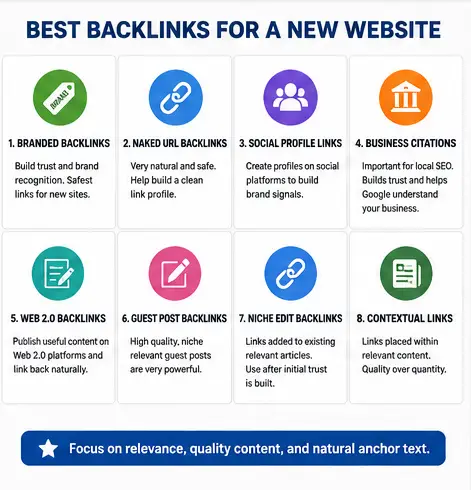
The Best Backlinks For A New Website
The best backlinks for a new website are not always the most powerful backlinks.
If you want a bigger breakdown, I have listed the main types of backlinks that can be used to power up a website’s SEO.
At the start, you want safe, natural, relevant links.
You want the backlink profile to look real.
Here are the best backlinks to build first.
1. Branded Backlinks
Branded backlinks are the safest backlinks for a new website.
These use your brand name, business name, or domain name as the anchor text.
Examples:
- Rankers Paradise
- RankersParadise.com
- https://rankersparadise.com
- visit Rankers Paradise
- this SEO website
This is natural.
Most new websites do not get loads of keyword-rich links straight away.
They get brand links first.
If your website is new, branded backlinks should make up a large part of your early link building.
2. Naked URL Backlinks
A naked URL backlink is when the anchor text is just the URL.
Example:
https://yourdomain.com
These are very natural.
People link like this all the time.
For a new website, naked URL anchors are useful because they build a clean backlink profile without over-optimizing for keywords.
3. Social Profile Backlinks
Social profile links are easy to build and good for brand signals.
You can create profiles on:
- X
- YouTube
- Medium
- Tumblr
- Quora
- About.me
- Blogger
- WordPress.com
These links may not all be powerful, but they help your brand look real.
They also help Google connect your website to your business name.
For a new website, this is a smart first step.
4. Business Directory Links
Business directory links are useful, especially for local websites.
You can submit your business to relevant directories.
For local SEO, citations are important because they show your business name, address, and phone number.
Good citation links can help Google understand:
- Who you are
- Where you are located
- What areas you serve
- What category your business is in
If your new website is for a local business, citations should be built early.
5. Web 2.0 Backlinks
Web 2.0 backlinks are good for new websites when built properly.
I have already put together a full step-by-step guide showing how to use web 2.0 sites for backlinks if you want to build these yourself.
You can create free blogs on platforms like:
- WordPress.com
- Blogger
- Tumblr
- Weebly
- Wix
- Medium
- Strikingly
Then you can publish niche relevant content and link back to your website.
You can also check my list of the best web 2.0 sites for backlinks if you want to know which platforms to use first.
The mistake people make is creating thin web 2.0 pages with one paragraph and a backlink.
That is not good.
If you use web 2.0 backlinks, make the content useful.
Add:
- A proper title
- 500+ words of content
- Images
- Internal links
- External authority links
- Natural anchor text
- A branded link to your website
Treat the web 2.0 like a real page.
The better the page looks, the better the link is.
6. Guest Post Backlinks
Guest posts are one of the best backlinks for new websites.
A guest post is when you publish an article on another website and include a backlink to your website.
If you are not sure which link type to use, read my comparison of PBNs vs guest posts vs web 2.0 backlinks.
The best guest post backlinks are:
- Niche relevant
- Published on real websites
- Indexed by Google
- Surrounded by useful content
- Not overloaded with outbound links
- Written naturally
- Linked to your page in a relevant way
Do not buy guest posts just because the website has a high DA or DR.
Look at the website manually.
Ask yourself:
- Is this a real website?
- Does it get organic traffic?
- Is the content decent?
- Is the niche relevant?
- Are the articles indexed?
- Does it link out to spammy websites?
- Would I be happy showing this website to a client?
If the answer is no, do not buy the link.
7. Niche Edit Backlinks
Niche edit backlinks are links added into existing articles.
These can work well because the page may already be aged and indexed.
But you need to be careful with niche edits.
For a new website, I would not make niche edits the first links you build.
I would use them after you already have:
- Branded links
- Social links
- Web 2.0 links
- Some guest posts
- A few blog posts ranking or getting impressions
Niche edits can be powerful, but they need to be relevant.
A backlink from an old, relevant article is good.
A backlink from a random unrelated page is not.
The Worst Backlinks For A New Website
Now let’s talk about what to avoid.
Bad backlinks can waste your time and money.
For a new website, bad backlinks can also make the backlink profile look unnatural.
Avoid these backlinks.
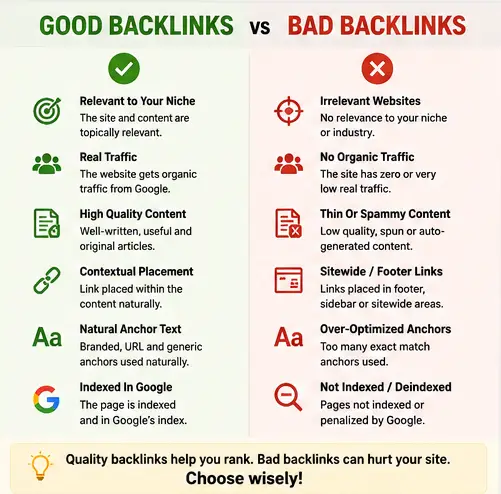
1. Massive Link Blasts
Do not buy packages that promise thousands of backlinks overnight.
These are usually automated spam links.
They may come from:
- Comment spam
- Forum profiles
- Auto-generated pages
- Low quality directories
- Scraper websites
- Spam blogs
This is not a good way to build a new website.
You do not need thousands of bad backlinks.
You need a small number of good ones.
2. Exact Match Anchor Spam
If your target keyword is buy backlinks for new website, do not use that exact anchor on every backlink.
That is over-optimization.
Google can understand what your page is about from the content, headings, internal links, and surrounding text.
You do not need to force exact match anchor text everywhere.
Use exact match anchors carefully.
3. Irrelevant Links
Relevance matters.
If your website is about SEO, a backlink from a page about SEO, marketing, blogging, or business makes sense.
A backlink from a random page about plumbing, gambling, pets, or fashion may not make sense.
Not every backlink has to be perfectly niche relevant, but you want as much relevance as possible.
4. Links From Spammy PBNs
Private blog networks can work, but many are very poor quality.
Bad PBNs have obvious footprints.
They may have:
- Thin content
- No real traffic
- Fake authority metrics
- Similar themes
- Similar hosting
- Lots of outbound links
- No real audience
- Random topics
If the PBN is low quality, avoid it.
A bad PBN link is not worth the risk.
5. Sitewide Footer Links
A sitewide link appears on many pages of a website, often in the footer or sidebar.
For a new website, this can look unnatural.
If your new domain suddenly gets hundreds of links from one website with the same anchor text, that is not ideal.
Contextual links inside content are usually better.
Safe Anchor Text Ratios For New Websites
Anchor text is the clickable text of a backlink.
This is one of the most important parts of link building.
For a new website, you want a natural anchor text profile.
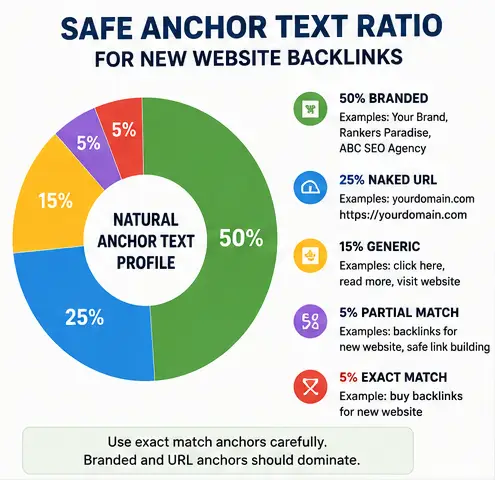
Here is a simple anchor text ratio I would use.
New Website Anchor Text Plan
- 50% branded anchors
- 25% naked URL anchors
- 15% generic anchors
- 5% partial match anchors
- 5% exact match anchors
This is not a fixed rule.
It is a guideline.
The main point is simple:
Do not overuse exact match anchors.
Branded Anchor Examples
- Your Brand Name
- Rankers Paradise
- ABC SEO Agency
- Joe’s Roofing
- Halo Nutrition
Naked URL Anchor Examples
- https://yourdomain.com
- yourdomain.com
- www.yourdomain.com
Generic Anchor Examples
- click here
- visit the website
- read more
- learn more
- this guide
- this page
Partial Match Anchor Examples
If your keyword is buy backlinks for new website, partial match anchors could be:
- backlinks for a new website
- new website backlinks
- buying backlinks safely
- backlink strategy for new websites
- safe backlinks for new sites
Exact Match Anchor Example
- buy backlinks for new website
Use exact match anchors very carefully.
For a new website, a little goes a long way.
Where To Point Your First Backlinks
A lot of people point every backlink to the home page.
Others point every backlink to one money page.
Both can be a mistake.
You want to spread backlinks across the site.
For a new website, I would point backlinks to:
- Home page
- Main service pages
- Blog posts
- Local landing pages
- Product category pages
- Useful guides
- About page sometimes
The home page should get some links because that looks natural.
But blog posts should also get links.
This helps you build topical authority.
For example, if you publish a blog post targeting a long tail keyword, build a few backlinks to that post. Then internally link from that post to your main service page.
This is a clean SEO strategy.
Best Pages To Build Backlinks To First
Here is the order I would use.
1. Home Page
Start with some branded home page links.
This helps build trust around your domain.
2. Informational Blog Posts
Build backlinks to useful blog posts.
These are easier to link to naturally.
A blog post like how to build backlinks for a new website is easier to link to than a hard sales page.
3. Main Service Pages
Once the site has some trust, build links to your main service pages.
Use mostly branded, generic, and partial match anchors.
4. Pages Already Getting Impressions
This is a good SEO trick.
Open Google Search Console and find pages that are already getting impressions.
If a page is showing on page 2 or page 3, it may only need a few links to move higher.
Do not always guess.
Use data.
90-Day Backlink Plan For A New Website
Here is a simple 90-day backlink plan you can follow.
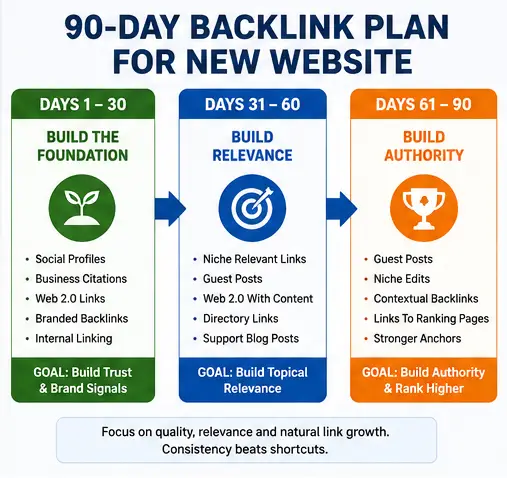
Days 1 To 30: Build The Foundation
The first month is about making your website look real.
Focus on brand signals and basic links.
Build:
- Social profiles
- Business profiles
- Local citations if relevant
- A few web 2.0 properties
- Internal links
- Basic branded backlinks
Anchor text:
- 70% branded
- 20% naked URL
- 10% generic
Where to point links:
- Home page
- About page
- Contact page
- Main blog posts
Goal:
Build a natural foundation.
Do not go aggressive.
Do not use lots of exact match anchors.
Days 31 To 60: Build Relevance
The second month is about topical relevance.
Now you can start building links from websites and pages related to your niche.
Build:
- Web 2.0 backlinks with better content
- Niche relevant guest posts
- Directory links
- Supporting blog post links
- A few contextual links
Anchor text:
- 50% branded
- 25% naked URL
- 15% generic
- 10% partial match
Where to point links:
- Home page
- Blog posts
- Main service pages
Goal:
Start building relevance and authority.
Look for pages getting impressions in Google Search Console.
Days 61 To 90: Build Authority
The third month is where you can start adding stronger links.
Build:
- Guest posts
- Niche edits
- Higher quality contextual backlinks
- More links to pages showing ranking movement
Anchor text:
- 40% branded
- 25% naked URL
- 20% generic
- 10% partial match
- 5% exact match
Where to point links:
- Pages already ranking
- Main money pages
- Supporting articles
- Home page
Goal:
Push pages that are already moving.
Do not waste links on bad pages.
Improve the content first, then build links.
Simple 90-Day Backlink Table
| Time Period | Link Types | Anchor Text | Pages To Link To | Main Goal |
|---|---|---|---|---|
| Days 1-30 | Social profiles, citations, web 2.0s, branded links | Branded, URL, generic | Home page, about page, blog posts | Build trust |
| Days 31-60 | Guest posts, web 2.0s, niche directories | Branded, URL, partial match | Blog posts, service pages | Build relevance |
| Days 61-90 | Guest posts, niche edits, contextual links | Branded, URL, partial, small exact match | Ranking pages, money pages | Build authority |
How Many Backlinks Does A New Website Need?
There is no exact number.
It depends on the keyword.
For low competition keywords, a few good backlinks can be enough.
For medium competition keywords, you may need more.
For hard keywords, a new website may need months of content and link building before it competes.
The best way to know is to check the top ranking pages.
Look at the SERP and ask:
- Is the keyword in the title?
- Is the content a good match?
- Is the page useful?
- Does the page have backlinks?
- Is the website authoritative?
- Is the search intent being answered properly?
- Are there weak pages ranking?
If the top results are weak, you have a chance.
If the top results are powerful, you need more time.
For a new website, I like targeting long tail keywords first.
Long tail keywords are easier to rank.
They bring in traffic.
They build topical authority.
They give the website a chance to grow.
Then you can target harder keywords later.
Can A New Website Rank Without Backlinks?
Yes, a new website can rank without backlinks.
But usually only for very low competition keywords.
If the keyword has weak SERPs, poor content, low authority pages, or bad search intent matching, good content can rank.
But backlinks make ranking easier.
Think of content as the engine.
Backlinks are the fuel.
If the content is bad, fuel will not help much.
If the content is good, backlinks can help it move faster.
How To Choose A Backlink Provider
If you are going to buy backlinks, choose the provider carefully.
Do not just buy the cheapest package.
Cheap backlinks are often cheap for a reason.
Before buying, ask these questions:
- Can I see the websites first?
- Are the websites niche relevant?
- Do the websites have organic traffic?
- Are the pages indexed?
- Is the content unique?
- How many outbound links are on each page?
- What anchor text will be used?
- Will the link be permanent?
- Is the link contextual?
- Is the website spammed with casino, CBD, crypto, or adult links?
A good backlink provider should care about quality.
If a link is a paid placement or sponsored placement, Google recommends that website owners qualify paid links correctly using attributes such as rel="sponsored" or rel="nofollow".
A bad provider will sell you anything.
Do not buy links just because the DA or DR looks good.
Metrics can be manipulated.
Look at the website manually.
If the site looks bad to you, it probably looks bad to Google too.
Cheap Backlink Packages For New Websites
You will see backlink packages that offer things like:
- 500 backlinks for $10
- 1,000 backlinks in 24 hours
- High DA backlinks guaranteed
- Instant ranking backlinks
- Powerful SEO link blasts
Be careful.
Most of these packages are not good for new websites.
A new website does not need thousands of random links.
It needs a clean backlink profile.
Quality beats quantity.
I would rather have 5 good backlinks from relevant websites than 1,000 spam links from random pages.
If the link package sounds too good to be true, it probably is.
What Makes A Good Backlink For A New Website?
A good backlink for a new website should have at least some of these qualities:
- It comes from a relevant website
- It is placed inside content
- The page is indexed in Google
- The site has real organic traffic
- The anchor text is natural
- The page is not full of spam links
- The content around the link makes sense
- The link points to a useful page
- The link helps build trust or relevance
Do not obsess over one metric.
A backlink can have a low DA and still be useful if it is relevant and real.
A backlink can have a high DA and be useless if the site is spammed.
Use common sense.
Content Comes Before Backlinks
This is important.
Before you buy backlinks for a new website, make sure the page deserves to rank.
Your target page should be better than what is already ranking.
That means:
- Better title
- Better introduction
- Better headings
- Better explanations
- Better examples
- Better internal links
- Better FAQ section
- Better user experience
Do not build backlinks to weak content.
Improve the content first.
If the page is thin, add more useful sections.
If the page does not answer the query, rewrite it.
If the page is hard to read, simplify it.
Good content plus good backlinks is how you rank.
On-Page SEO Checklist Before Buying Backlinks
Use this checklist before you start link building.
- Target keyword in SEO title
- Target keyword in H1
- Target keyword in first 100 words
- Related keywords in H2 headings
- Short paragraphs
- Clear internal links
- External links where useful
- Optimized images
- Fast page speed
- Mobile-friendly design
- FAQ section
- Schema markup if needed
- Page submitted in Google Search Console
This does not need to be complicated.
Just make the page clear, useful, and optimized.
Internal Linking Strategy For New Websites
Internal links help Google understand your website.
They also help pass authority between pages.
If you build backlinks to a blog post, that blog post should link to your important pages.
For example:
A blog post about how to build backlinks for a new website can internally link to:
- Your backlink services page
- Your SEO services page
- Your link building guide
- Your keyword research guide
- Your contact page
This helps users and search engines.
Do not just publish blog posts and leave them alone.
Connect them together.
How To Know If Your Backlinks Are Working
You need to track results.
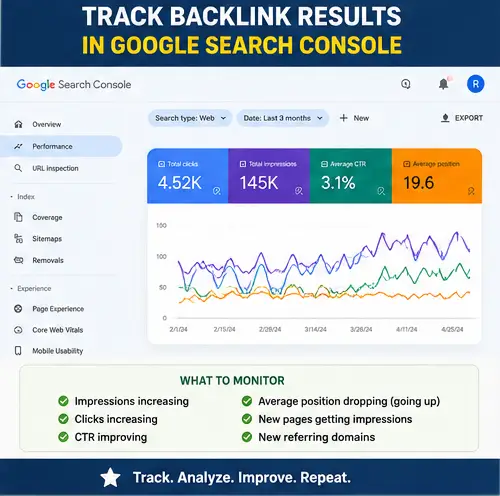
Do not build backlinks blindly.
Track:
- Keyword rankings
- Google Search Console impressions
- Clicks
- Indexed pages
- Referring domains
- Anchor text
- Organic traffic
- Pages gaining visibility
- Pages stuck on page 2 or 3
The Search Console performance reports are useful because they show which queries bring users to your site, plus impressions, clicks, and average position.
Backlinks can take time to work.
Sometimes you see movement in a few days.
Sometimes it takes weeks.
Sometimes the page needs better content before the links help.
SEO is not always instant.
But if the content is good and the backlinks are relevant, you should start seeing signs of movement.
I also recommend reading this guide on tracking SEO gains from purchased backlinks so you know what to monitor after the links go live.
When Should You Build More Backlinks?
Build more backlinks when:
- The page is indexed
- The page is getting impressions
- The page is ranking on page 2 or 3
- The content is already optimized
- The keyword is worth targeting
- The current backlinks are indexed
- The SERP is beatable
Do not just keep adding links to a page that is not ready.
Sometimes the problem is not backlinks.
Sometimes the problem is content.
Sometimes the problem is search intent.
Sometimes the keyword is too hard for a new website.
Check everything before spending more money.
Common Mistakes New Website Owners Make
Here are the biggest mistakes I see people make when they buy backlinks for a new website.
Mistake 1: Building Links Before Content
Do not build backlinks to an empty website.
Publish useful content first.
Mistake 2: Using Too Much Exact Match Anchor Text
Exact match anchors are powerful, but risky when overused.
Use them carefully.
Mistake 3: Buying The Cheapest Links
Cheap links usually mean low quality.
Quality matters more than quantity.
Mistake 4: Only Linking To The Home Page
Spread links around your website.
Link to blog posts, service pages, and supporting pages.
Mistake 5: Ignoring Internal Links
Internal links help backlinks work better.
Use them properly.
Mistake 6: Not Tracking Results
If you do not track rankings and impressions, you will not know what is working.
Mistake 7: Going Too Fast
New websites need steady link growth.
Do not blast links too quickly.
Mistake 8: Ignoring Relevance
Relevant backlinks are better than random backlinks.
Choose links that make sense.
Buy Backlinks For New Website: My Recommended Strategy
If I was starting a brand new website today, this is what I would do.
First, I would build the website properly.
I would create the home page, service pages, about page, contact page, legal pages, and at least 5 to 10 blog posts.
Then I would make sure everything is indexed.
Then I would build branded links.
I would create social profiles, business profiles, citations, and web 2.0 properties.
Then I would publish more supporting content.
After that, I would start building guest posts and niche relevant backlinks.
I would use mostly branded and URL anchors at the start.
I would only use exact match anchors occasionally.
I would watch Google Search Console to see which pages are getting impressions.
Then I would build more backlinks to the pages that are already showing movement.
That is how I would build a new website.
Slow at the start.
Clean backlink profile.
Good content.
Relevant links.
Consistent growth.
If you do not want to build the links yourself, you can buy high quality backlinks directly from Rankers Paradise and let us do the work for you.
If you want the full campaign handled for you, take a look at our monthly SEO packages.
Final Thoughts
You can buy backlinks for a new website, but you need to do it properly.
A new website does not need thousands of backlinks.
It needs the right backlinks.
Start with the foundation.
Build branded links.
Create social profiles.
Use web 2.0 backlinks properly.
Add guest posts and niche relevant links.
Use natural anchor text.
Point backlinks to different pages.
Track your results.
Improve your content.
Build slowly and consistently.
That is how you give a new website the best chance of ranking in Google organic SERPs.
If you want fast rankings, do not look for shortcuts.
Build the site properly.
Choose low competition keywords.
Create better content than the pages already ranking.
Then use backlinks to push the pages higher.
That is the smart way to buy backlinks for a new website.
Frequently Asked Questions
Can I Buy Backlinks For A New Website?
Yes, you can buy backlinks for a new website, but you should build them slowly. Start with branded links, social profiles, citations, web 2.0 backlinks, and niche relevant guest posts.
Is It Safe To Buy Backlinks For A New Domain?
It can be safe if the backlinks are relevant, natural, and built at a sensible pace. It becomes risky when you buy spam links, use too much exact match anchor text, or build too many backlinks too quickly.
How Many Backlinks Should A New Website Have?
There is no exact number. A new website targeting low competition keywords may only need a few good backlinks. Harder keywords need more links, more content, and more time.
What Are The Best Backlinks For New Websites?
The best backlinks for new websites are branded backlinks, naked URL links, social profile links, business citations, web 2.0 backlinks, guest posts, and niche relevant contextual links.
Should I Build Backlinks To My Homepage First?
Yes, it is natural to build some backlinks to your home page first. But you should also build backlinks to blog posts, service pages, and other useful pages.
What Anchor Text Should I Use For A New Website?
Use mostly branded, naked URL, and generic anchor text. Use partial match and exact match anchors carefully. Do not over-optimize your backlink profile.
Can A New Website Rank Without Backlinks?
Yes, a new website can rank without backlinks for very low competition keywords. But backlinks usually help rankings improve faster and make it easier to compete.
Are Web 2.0 Backlinks Good For New Websites?
Yes, web 2.0 backlinks can be good for new websites if they are built properly. Use unique content, relevant topics, natural anchors, and make the web 2.0 property look like a real page.
Should I Buy Cheap Backlink Packages?
Be careful with cheap backlink packages. Many cheap backlink packages use spammy links, automated links, or irrelevant links. A few good backlinks are better than thousands of bad ones.
When Should A New Website Start Building Backlinks?
A new website can start building backlinks once the main pages are published, indexed, and optimized. Start with branded and foundational links before moving into stronger backlinks.
What Is Link Velocity For A New Website?
Link velocity is the speed at which your website gains backlinks. For a new website, link velocity should be natural and steady. Do not build hundreds of links overnight.
Should I Use Exact Match Anchor Text?
You can use exact match anchor text sometimes, but do not overuse it. For a new website, exact match anchors should be a small part of the overall anchor text profile.
Are Guest Posts Good For New Websites?
Yes, guest posts are good for new websites if they are published on real, relevant websites. Avoid guest posts on spammy websites that publish every niche and have no real traffic.
Are Niche Edits Good For New Websites?
Niche edits can be good, but they are better after your website already has some branded links and content. Make sure the niche edit is placed on a relevant, indexed page.
What Pages Should I Build Backlinks To First?
Start with the home page, then build backlinks to useful blog posts and important service pages. Pages already getting impressions in Google Search Console are good targets for more backlinks.
How Long Do Backlinks Take To Work?
Backlinks can take days, weeks, or longer to work. Google needs to crawl the backlink, process the signal, and then adjust rankings. Be patient and track results.
Do Backlinks Help New Websites Get Indexed?
Backlinks can help Google discover new pages. However, you should also submit your sitemap in Google Search Console and make sure your pages are crawlable.
What Is The Safest Way To Buy Backlinks For A New Website?
The safest way is to build slowly, use branded anchors, choose relevant websites, avoid spam links, point links to different pages, and track your rankings over time.
Can Too Many Backlinks Hurt A New Website?
Too many low quality backlinks or too many exact match anchors can create problems. Focus on quality, relevance, and natural link growth.
Is Buying Backlinks Worth It For A New Website?
Buying backlinks can be worth it if the links are high quality and the website has good content. If the website is thin or poorly optimized, fix the content first before buying backlinks.
If you add FAQ schema to an article, follow Google’s guidance on FAQPage structured data so the markup matches the visible questions and answers on the page.