
If you’re building Web 2.0 sites to boost your rankings, you’ve probably felt that frustration: you spend hours crafting content, adding your links, and hitting “publish”—but your money site doesn’t move an inch. You check your backlink profile, the links are “there,” but they’re effectively invisible.
The culprit? Web 2.0 orphan pages.
I see this all the time with my clients. They treat their Web 2.0s like a “post and forget” dump for links, ignoring the fundamental crawl structure that Google demands in 2026. If you want to move the needle, you have to stop treating these sites like link farms and start treating them like actual blogs.
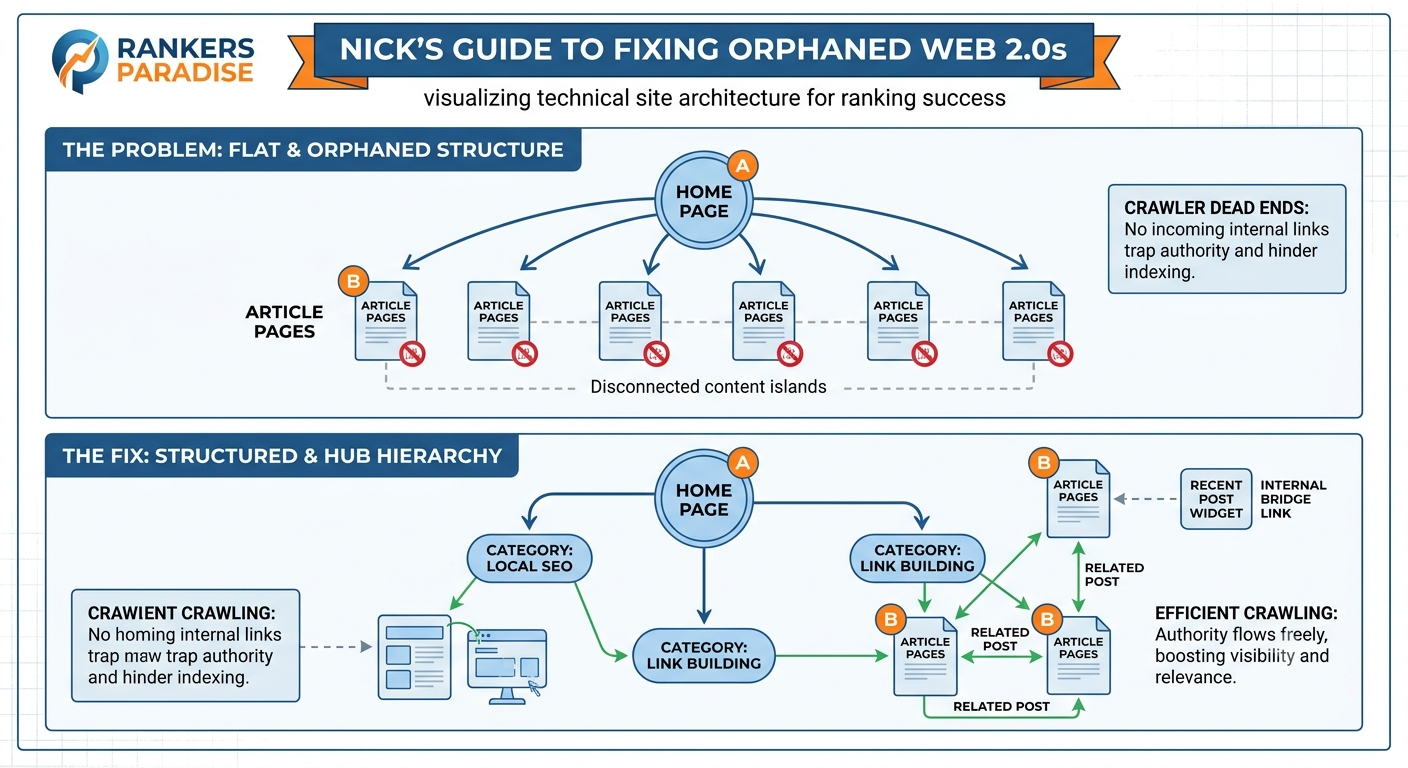
What Are Web 2.0 Orphan Pages?
An orphan page is any page on your site that isn’t linked to from any other page on that same site.
Think of your Web 2.0 site as a house. If you build a room (a page) but don’t build a door (a link) leading to it, no one can get in. Googlebot is your visitor. If it lands on your homepage and doesn’t see a navigation path to your latest post, that post becomes an “island.”
Even if you use an indexer or the Rank Math Instant Indexing API to “force” the page into Google’s index, it has zero internal authority. Without internal links, that page is essentially a dead-end, and the “link juice” it’s supposed to pass to your money site is trapped.
Why Orphaned Pages Prevent Top Rankings
In 2026, Google’s algorithms are obsessed with topical authority and semantic relevance. A site filled with orphan pages signals to Google that the content isn’t part of a cohesive “topic cluster”—it’s just a random, disconnected string of URLs.
Here’s why orphan pages are killing your SEO:
-
Crawl Budget Waste: Googlebot has a limited crawl budget for every site. If your site structure is messy or non-existent, the bot wastes energy trying to navigate a “ghost town,” leading to slower indexing for your important content.
-
Lack of Link Equity Flow: PageRank isn’t just about external backlinks; it’s about internal distribution. If a post has no incoming links from your own site, it’s not receiving the authority it needs to be “valuable” enough to rank your money site.
-
The “Spam” Footprint: A blog without internal navigation, category links, or a site map is a classic marker of automated link-building. You want your Web 2.0s to look like human-run projects, not disposable assets.
How to Fix Orphan Pages: The “Authority Bridge” Strategy
You don’t need to be a developer to fix this. If you are serious about ranking your web 2.0 backlinks, follow this three-step “Authority Bridge” protocol.
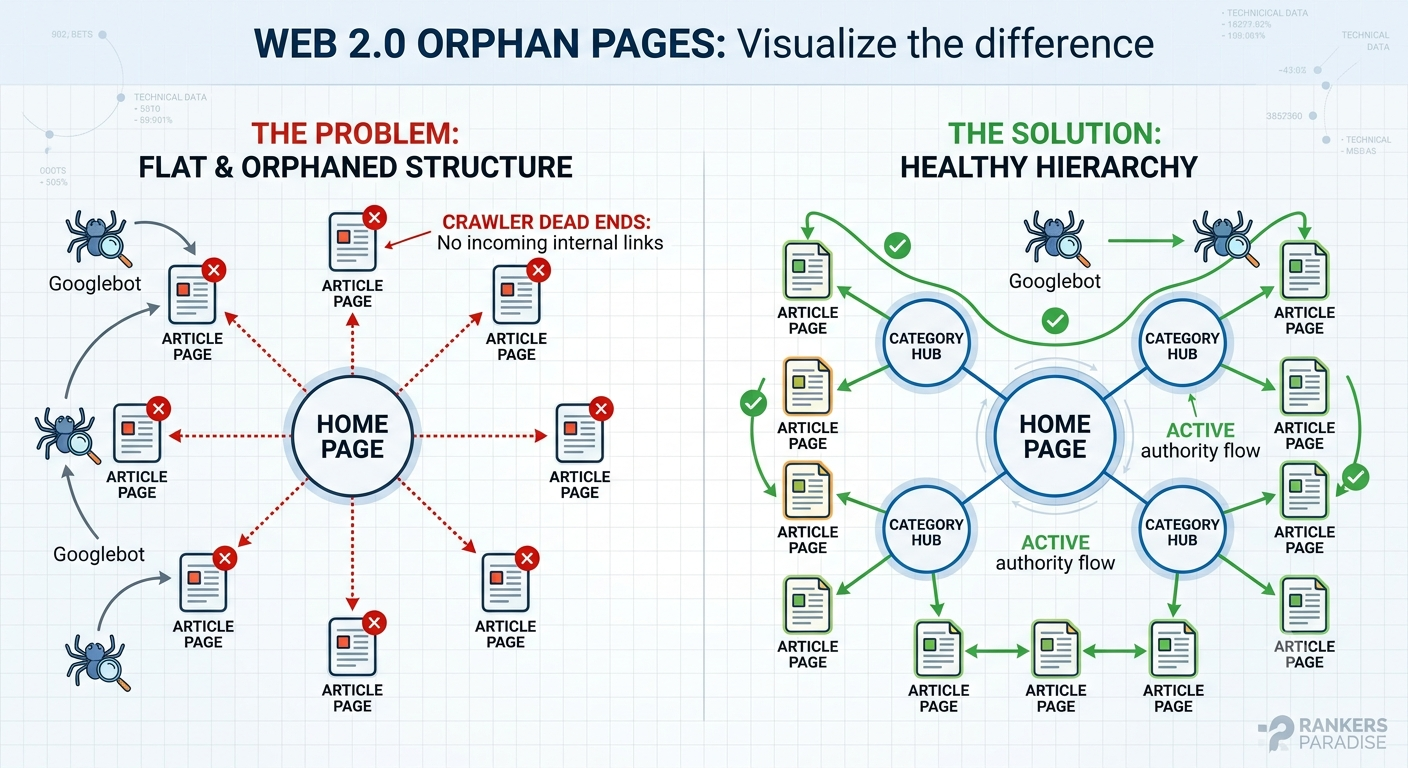
1. The “Recent Posts” Widget (The Doorway)
Don’t let your posts live in isolation. Every platform (Blogger, WordPress.com, Wix) allows you to add widgets. Go to your site settings and add a “Recent Posts” or “Archives” widget to your sidebar or footer. This ensures that every new page you publish automatically gets an incoming link from every other page on the site.
2. The Internal “Bridge” Link (The Context)
This is what sets the pros apart. When you publish a new article, don’t just leave it. Go to one of your older posts on the same Web 2.0 site and add a contextual link to the new one.
Use natural, descriptive anchor text. For example: “If you want to know more about [your niche keyword], check out my latest guide here.” This creates a “breadcrumb” for the Google crawler, linking your content together into a logical, thematic cluster.
3. Build a “Hub” Page (The Master Key)
If you are managing a large number of posts on a single Web 2.0 property, create a dedicated “Site Map” or “Resources” page. List every article you’ve written with a clean, clickable link. Link this page in your footer. Now, you have a single source of truth that guarantees every page on your site is no more than two clicks away from the homepage.
Pro Tip: Indexing Is Not Ranking
Getting a page indexed is step one, but it doesn’t mean it’s passing authority. If you’re struggling with the basics of setting these up, check out my Do-It-Yourself SEO Guide for a deeper look at how to manage these assets safely.
Remember, Google’s 2026 algorithm prioritizes sites that provide a clean, logical experience for the user. By fixing your orphan pages, you aren’t just making your site easier for the bots to crawl—you’re building a more robust, authoritative backlink profile that will actually stand the test of time.
Want to see how I structure these for maximum impact? Read more about my Web 2.0 link wheel strategy and start building assets that actually perform.
Have you audited your Web 2.0s lately? Check your “orphan page” count using a free tool like Screaming Frog—you might be surprised at how much hidden authority you’re leaving on the table.