
How much should Web 2.0 backlinks cost?
You can actually build them for free.
That does not mean they cost you nothing.
I have built these links myself for years. The platforms can be free, but doing the job properly takes time. You need to open the accounts, set up the sites, add content, insert the links, publish everything and then check whether the pages actually stay live.
This is where people get confused about the price.
You are not really paying somebody for access to WordPress.com, Blogger or another free publishing platform. You are paying for the work involved in building the properties properly.
And there is a massive difference between somebody opening 20 accounts with automated software and somebody actually building useful little sites.
I have tested enough of these links to know which one I would rather have pointing at my money site.
This guide will show you what I think you should pay, what changes the price, whether the really cheap packages are worth touching and when I would simply build the links myself.
Web 2.0 Backlinks Cost: The Quick Answer
There isn’t one sensible fixed price.
A basic link can be incredibly cheap because the actual platform may cost nothing to use.
A properly built property costs more because somebody has to spend time on it.
Think about what actually needs doing:
- Find a suitable platform.
- Register an account.
- Create the site.
- Give it a relevant name.
- Set up the basic pages.
- Write unique content.
- Format the article.
- Add images where appropriate.
- Insert your backlink naturally.
- Use sensible anchor text.
- Publish the page.
- Check that the URL is publicly accessible.
- Keep a record of the login and live URL.
- Check whether the property survives.
That is a completely different service from firing thousands of URLs through a piece of software.
I would therefore avoid judging a package by the number of links alone.
10 properly constructed properties can be more useful to me than 1,000 junk URLs.
I have seen this over and over again.
A huge backlink count looks impressive on a sales page. It does not automatically translate into better Google rankings.
Why Can You Build Them for Free?
This is the bit that makes the pricing confusing.
Many publishing platforms let you create a site without buying a separate domain or hosting account.
For example, WordPress.com lets users create and publish websites, while Blogger allows users to create blogs and use a Blogspot address.
You can therefore do the entire job yourself.
If you want to see exactly how I approach it, I have already put together my full web 2.0 backlinks tutorial showing the process I use.
This is worth understanding before paying anyone.
Once you know what goes into one good property, you can look at a backlink package and work out whether the price makes sense.
If somebody is selling hundreds of supposedly hand-built sites for almost nothing, ask yourself a simple question:
How much actual work could possibly have gone into each one?
The maths normally answers the question.
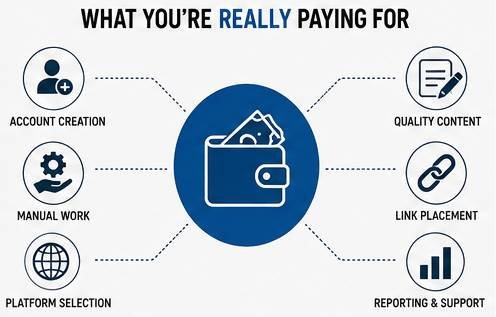
What Are You Actually Paying For?
You are paying for time.
That is the easiest way I can explain it.
Imagine I create one property myself.
I have to register it, make it look reasonable, create a piece of relevant content, add the target link and publish everything.
If I want it to look like a genuine website rather than something created solely to hold a backlink, I might also add an About page, another article, an image and some basic branding.
Now multiply that across 10, 20 or 50 sites.
The work stacks up quickly.
This is why a genuinely manual service cannot realistically compete on price with an automated blast.
They are different products.
Cheap Does Not Automatically Mean Bad
I don’t automatically reject a backlink because it is cheap.
That would be silly.
The platforms themselves are often free.
Somebody who has a streamlined system for building these properties can offer them at a reasonable price and still do the work properly.
What I care about is what I receive.
Open the URLs.
Look at the pages.
Read the content.
Check the backlink.
Does it look like something created for a real reader?
Or does it look like somebody pressed a button?
That tells me considerably more than the invoice.
What Makes a Good Web 2.0 Property?
I look at the finished page rather than obsessing over a single SEO metric.
The first thing I want is relevant content.
If I am linking to an SEO website, I want the surrounding article to be about SEO, rankings, links, marketing or something closely related.
I do not want an article about gardening with an exact-match SEO anchor stuffed into paragraph four.
That looks ridiculous.
I also want enough content on the page to give the backlink some context.
A 100-word page containing three outgoing links is not the same thing as a useful article built around a genuine subject.
Then I check the site itself.
Does it have a proper title?
Is the article formatted?
Is the property public?
Does the link work?
Has the account survived?
These are basic checks, but cheap services regularly fail them.
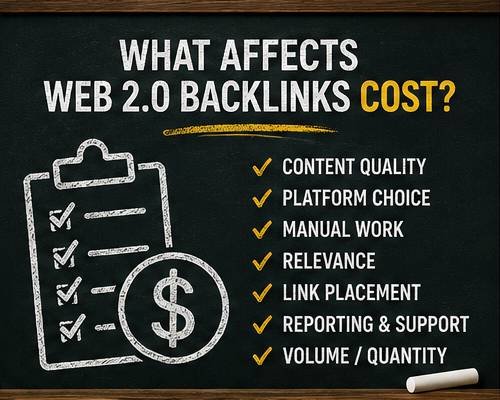
The Biggest Cost Is Content
This is where a lot of providers cut corners.
Building an account is easy.
Filling it with something worth publishing takes longer.
If you are paying for manually written content, the price naturally rises.
If generated content is being used, production can be much quicker.
I do not think the question should simply be whether AI was involved.
I care about the finished page.
Does the content make sense?
Is it useful?
Is it unique enough to deserve its own URL?
Has somebody checked it?
Does the backlink belong in the article?
Bad content is bad content regardless of how it was produced.
The problem starts when providers create hundreds of near-identical articles and swap a few words around.
That is not something I want supporting an important website.
Do You Need Expensive Content on Every Property?
No.
This is where you can waste money.
You are building supporting properties. You are not commissioning a national newspaper investigation for every backlink.
The content needs to be good enough to make the page useful and relevant.
That is different from paying for a 3,000-word masterpiece every time.
I normally prefer straightforward content built tightly around the subject.
No filler.
No endless introduction.
No paragraph telling me that SEO is important in today’s digital landscape.
Get to the point.
A focused article surrounding the backlink is what I want.
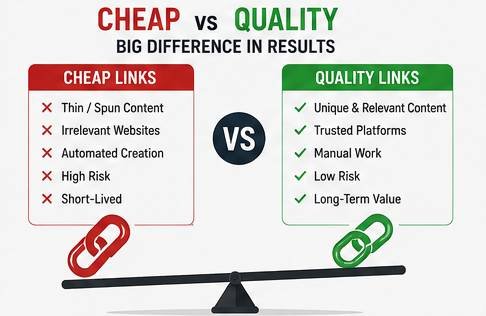
Why Extremely Cheap Packages Make Me Nervous
There is a level where the price simply stops making sense.
Suppose somebody promises:
500 manual Web 2.0 properties + unique articles + images + indexing + permanent links
for the price of lunch.
Something has to give.
Usually it is one of these:
content quality, platform quality, account setup, relevance, manual checking or longevity.
Sometimes practically everything has been automated.
Automation itself isn’t some forbidden word.
I use tools all the time.
The question is whether the automation destroys the quality of the finished result.
That is the important part.
Do Not Pay Extra Just Because Somebody Shows You DA
This is another mistake I see.
A seller says:
DA 90 BACKLINK!
The platform may have strong domain-level metrics.
Your brand-new page does not magically inherit every backlink pointing at the root domain.
This distinction matters.
A fresh user-created URL might begin with practically no page-level authority of its own.
That doesn’t make the property useless.
It means you should understand what you are buying.
I would never pay a huge premium simply because somebody puts a big third-party domain metric next to the service.
Look at the complete backlink.
Relevance Is Worth Paying For
If I had a choice between:
50 random properties
and
10 carefully selected, relevant properties
I would normally take the second option.
Context matters.
The page surrounding the link should make sense.
The anchor should fit the sentence.
The destination should be useful to somebody reading the article.
This also makes the entire property look more natural.
If I am building links to a page about technical SEO, I can create supporting articles about crawling, indexing, site architecture, internal links or search visibility.
There are dozens of legitimate angles.
There is no reason to dump an unrelated link into random content.
How Much Would I Pay Per Link?
I don’t use a rigid per-link number because the specification changes the value.
A bare property with thin content should be cheap.
A carefully constructed site with good content, proper formatting and manual checks deserves a higher price.
Instead of asking:
“How cheap can I get 100 links?”
I would ask:
“What exactly am I getting for my money?”
Request examples.
Look at previous work.
Ask how much content goes onto each property.
Find out whether the pages are manually checked.
Ask which platforms are being used.
Check whether you receive a report containing the live URLs.
If the seller cannot answer those basic questions, I would not care how cheap the package is.
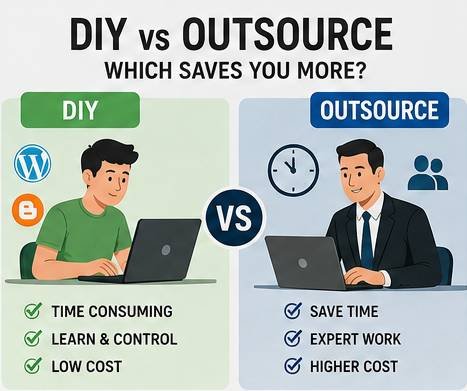
DIY vs Paying Someone Else
This is the decision that actually matters.
Build them yourself when:
You have more time than budget.
You want complete control.
You only need a small number.
You want to learn how the strategy works.
You are testing a new website or keyword.
DIY is also useful because you learn what a decent property actually looks like.
That makes buying links much easier later.
Pay somebody when:
You need scale.
Your time is worth more elsewhere.
You have multiple websites.
You already understand the strategy.
You want somebody else handling account creation and content publishing.
This is basically the same reason I outsource anything.
I can technically do it myself.
That doesn’t always mean I should.
Put a Value on Your Own Time
This is the hidden part of Web 2.0 backlinks cost that people forget.
Let’s say you need 20 properties.
Even if every platform is completely free, you could spend hours creating them.
What is your time worth?
£10 an hour?
£30?
£100?
That changes the calculation.
If I can spend those hours improving a money page, researching keywords or working on something that makes more money, outsourcing the links can be cheaper even when the DIY option has a £0 platform fee.
Free and cost-effective are not always the same thing.
What About Buying Larger Backlink Packages?
This requires more care.
When you move beyond a handful of supporting properties and start purchasing links at scale, you need to understand the wider backlink profile.
I have written a separate guide explaining how I buy backlinks and what I look at before pointing paid links toward a website.
Do not buy links just because a package contains a large number.
Start with the target page.
Look at the competition.
Work out what you actually need.
Then build from there.
Buying 5,000 links because 5,000 sounds better than 50 is not a strategy.
I Prefer to Test Links
I have always liked testing SEO instead of repeating what everybody else says.
Set up a page.
Track the keyword.
Build the links.
Wait.
Check the movement.
That tells you something.
If rankings improve, keep watching.
If nothing happens, look at the indexing, relevance, anchors, competition and quality of the properties.
Change one thing at a time where possible.
Otherwise you don’t know what caused the movement.
This is particularly important if you run SEO campaigns regularly.
Eventually you build your own data.
That is worth more than somebody on social media telling you a particular backlink “works.”
A Cheap Test Is Better Than a Huge First Order
If you find a provider you have never used, don’t immediately buy the biggest package.
I would start small.
Buy a sample.
Check the report.
Open every URL.
See whether the sites remain live.
Check the content.
Look at the anchor placement.
See whether the pages become discoverable.
If everything looks good, scale it.
This sounds obvious, yet people regularly spend hundreds or thousands before checking a single example.
What Should a Backlink Report Include?
At minimum I want the live URLs.
Preferably I also want:
- Platform used
- Published page URL
- Anchor text
- Target URL
- Date created
- Login details where ownership is included
- Status
I don’t need a beautiful 40-page PDF.
Give me the data.
I can check everything myself from there.
Do More Expensive Links Rank Better?
Not automatically.
Price is not a ranking factor.
You can overpay for rubbish just as easily as you can buy rubbish cheaply.
This is why I keep coming back to testing.
I have seen inexpensive links move rankings.
I have seen expensive links do very little.
The price tag tells Google nothing.
The actual backlink and the page it sits on are what matter.
What About Link Wheels?
You can also connect supporting properties instead of treating every site as an isolated page.
I have tested this approach separately using a Web 2.0 link wheel.
The basic idea is that supporting properties can link through a planned structure rather than every page simply pointing straight toward the target.
I don’t make every campaign unnecessarily complicated.
Sometimes a simple structure works perfectly well.
But if you are paying somebody to create a more involved network, expect the cost to increase because there is more work involved.
Do Not Forget Anchor Text
This is one area where paying for a managed service can make sense.
If you are building everything yourself, you control every anchor.
If somebody else is doing it, give them instructions.
I would not want 50 new properties all using exactly the same commercial anchor.
Mix things up.
Use the brand.
Use the URL.
Use natural phrases.
Use relevant partial-match anchors where they fit.
Use exact match selectively rather than mechanically.
The backlink should read naturally inside the sentence.
If it looks forced when you read the paragraph aloud, rewrite it.
Should Every Web 2.0 Link Point at Your Homepage?
No.
Deep links are useful.
If you have a useful guide, category page, service page or case study, you can link directly to it when the surrounding article makes sense.
For example, when discussing ranking campaigns in competitive gambling markets, I could naturally reference my iGaming SEO case study.
That makes considerably more sense than forcing every supporting article to point at the homepage.
Build links around the actual pages you want people and search engines to discover.
Check Your Existing Links Before Spending More Money
Sometimes you don’t need another backlink package.
You need to understand what you already have.
Before throwing more links at a website, check:
which pages are attracting links, what anchors are being used, whether old links have disappeared, where suspicious links are coming from and whether your important pages are actually receiving enough internal and external support.
I have a complete backlink audit process for doing this.
This becomes increasingly important on older domains.
A new website might have 20 referring domains.
An established site could have thousands.
Adding more without understanding the existing profile is not always the smartest move.
Can You Get These Links for Nothing?
Yes.
This is why I recommend learning the process even if you eventually outsource it.
WordPress.com and Blogger are examples of platforms that allow users to publish their own sites or blogs.
There are plenty of other platforms too.
The important thing is not creating an account.
Anybody can do that.
The useful bit is turning that empty account into a property containing content that makes sense for the backlink you want to place.
That is the work you are paying a provider to do.
Are Web 2.0 Backlinks Safe?
There is no blanket answer.
A publishing platform isn’t automatically good or bad.
How you use links matters.
Google publishes spam policies covering link spam and attempts to manipulate rankings. If you are paying for links or building them primarily to influence search results, you should understand those policies before deciding how aggressive you want to be.
I don’t pretend there is zero risk in SEO.
I test things.
I look at the results.
I decide what level of risk makes sense for the website.
A disposable test site and a business that has taken ten years to build are not the same thing.
Treat them accordingly.
What I Would Avoid Paying For
There are a few things I personally don’t get excited about.
Thousands of instant links
The number is usually the sales pitch.
Identical spun articles
If I can spot the footprint immediately, I’m not interested.
Huge DA claims
Domain-level metrics do not tell me everything about a brand-new user page.
Guaranteed rankings
Nobody controls Google’s results.
Mystery platforms
If I cannot see where the links are being created, I don’t want them.
Exact-match anchor blasts
I prefer control over the profile.
Packages where nobody will show examples
That one speaks for itself.
What I Am Happy to Pay For
I will pay for saved time.
I will pay for good content.
I will pay for careful manual work.
I will pay for sensible anchor placement.
I will pay for somebody checking that the properties are actually live.
I will pay for clean reporting.
I will pay for experience.
Those things have value.
The account itself may be free.
The work is not.
How I Would Price the Decision
Here is the simple calculation I use:
DIY cost = platform costs + content costs + your time
Compare that against:
Outsourced cost = service price + time spent checking the work
Now the decision becomes much easier.
If you enjoy building the properties and have spare time, DIY can make sense.
If you run 20 websites and need hundreds of supporting pages, doing everything yourself can become a false economy.
There isn’t one correct answer.
Do Not Build 100 Links When You Only Need 10
This is another reason costs get out of hand.
Start by checking the SERPs.
Look at the websites ranking above you.
Look at their content.
Look at their backlinks.
Look at their authority.
If you are targeting a genuinely weak keyword, you may not need much.
This is why keyword selection is so important.
I would rather target something achievable and use 10 good links than attack a monster keyword and throw hundreds of links at it hoping something happens.
SEO becomes much cheaper when you choose your battles properly.
Track the Result, Not the Link Count
After the links are live, stop staring at the spreadsheet.
Watch the keyword.
That is the result I care about.
If I go from position 38 to position 14, something has changed.
If I move from position 14 to position 6 after the next batch, I have more information.
If I spend £500 and nothing moves, the fact that I received 2,000 URLs doesn’t make me feel better.
Backlinks are a means to an end.
The end is improved organic visibility and useful traffic.
My Final View on Web 2.0 Backlinks Cost
You can build these links yourself without paying for the platform, so technically the starting price can be £0.
But your time isn’t free.
Neither is good content.
Neither is somebody else’s experience.
That is why I don’t judge these services purely by the cheapest price per backlink.
I want to know what is actually being built.
If the properties contain useful relevant content, the links are placed naturally, the pages stay live and the campaign moves the target keywords, I am interested.
If I receive 10,000 garbage URLs that never do anything, I don’t care how cheap they were.
Start small.
Check the work.
Track your rankings.
Scale what works.
That is how I approach it.
Frequently Asked Questions
How much do Web 2.0 backlinks cost?
The platforms themselves can be free, so DIY links may have no direct platform charge. Paid services cost more because you are paying for account creation, content, setup, publishing, link placement and reporting.
Why do some packages cost much more than others?
The specification can be completely different. One provider might use automated account creation and thin content while another manually builds each property and adds substantial relevant material. Compare the actual deliverables rather than link count alone.
Are cheap Web 2.0 backlinks worth buying?
They can be, but check samples first. Cheap does not automatically mean poor quality because many platforms are free. Extremely low prices combined with huge quantities, however, usually mean corners have been cut somewhere.
Can I build Web 2.0 links myself?
Yes. This is one of the reasons I like this type of link. You can create accounts on publishing platforms, add your own content and control the links yourself.
Is it better to buy 100 cheap links or 10 quality links?
I would normally choose the smaller number if the properties are genuinely better. Link quantity alone doesn’t tell you whether a campaign will improve rankings.
Should I pay extra for high-DA Web 2.0 links?
Not solely because of DA. A strong root domain does not mean your newly created user page has the same authority. Assess the actual page, content, relevance and backlink rather than buying based on one third-party metric.
How many Web 2.0 backlinks do I need?
There is no universal number. It depends on your target keyword, current rankings, website authority, competing pages and the rest of your backlink profile. Start with a manageable number, track the SERPs and make the next decision from actual results.
Are free Web 2.0 backlinks better than paid ones?
A paid link is not inherently better. You are generally paying someone to do the work for you. If you build the same property yourself to the same standard, the fact that you didn’t pay a service provider does not make the finished page worse.
Should I outsource Web 2.0 link building?
Outsource it when the value of the time saved exceeds the service cost and you have found somebody whose work meets your standards. If you have never built these links before, I recommend creating some yourself first so you know what to look for.
What is the biggest mistake when buying these backlinks?
Buying by quantity alone. A giant number in a package description can distract you from the things that actually matter: the content, platform, relevance, anchor, live URL and quality of the finished property.
Can Web 2.0 links still help rankings?
They can be tested like any other SEO tactic: establish your starting positions, build links in a controlled way and monitor what happens. Avoid assuming that every link will have equal value or that a particular result is guaranteed.
What should I check before paying for a package?
Ask for examples. Check the platforms, content quality, anchor placement, live URLs and reporting. I would also start with a small order before committing serious money.
Useful External References
Before building or purchasing links, read Google’s current Search spam policies, particularly its section covering link spam and ranking manipulation.
For people who want to build properties themselves, the official WordPress.com documentation explains how its websites are created and published, while Google’s Blogger service provides another straightforward blogging platform.