
I am going to show you exactly how you can spot hidden PBN footprints before you part with your hard-earned cash. I show you the exact warning signs to look out for so you do not risk a Google penalty and most importantly, you get good keyword ranking results from real websites.
To prove that you can spot these fake sites easily in 2026, I will include a complete technical walk-through and a step-by-step audit guide below. You can see and check for yourself if a vendor is selling trash network links or real authority contextual links.
You can follow this guide step-by-step for free to protect your website ranking for any keyword in the Google SERPs.
Before we go any further you should understand the core problem here.
When you want to buy backlinks, you are looking for real, editorial mentions on active websites. But many vendors will try to sell you links from a Private Blog Network (PBN) while claiming they are “genuine guest posts.”
If Google bot catches you buying links from a sloppy PBN footprint, your organic keyword rankings will drop fast. Before you start ordering any links, you should take the time to read through the official [Google Search linking policies] to understand how the search spider views link manipulation.
SCROLL DOWN FOR THE EXACT STEPS TO SPOT A HIDDEN PBN VENDOR (ALL OF THEM WORK – TRIED AND TESTED).
How to Check If Your Link Seller is Using a PBN
Before you hire a link building specialist or hand over a budget to a new provider, you must test their sample domains.
Head on over to a free tool like Serp Robot or use your preferred SEO software like Ahrefs or Semrush. You need to look past the surface-level metrics like Domain Rating (DR) or Domain Authority (DA). PBN sellers manipulate these numbers easily.
Instead, look at the actual Google search ranking results for the seller’s domain.
Analyze the Google SERPs for the Sample Sites
To assess if the link seller is safe, look out for these specific warning signs on their sample websites:
-
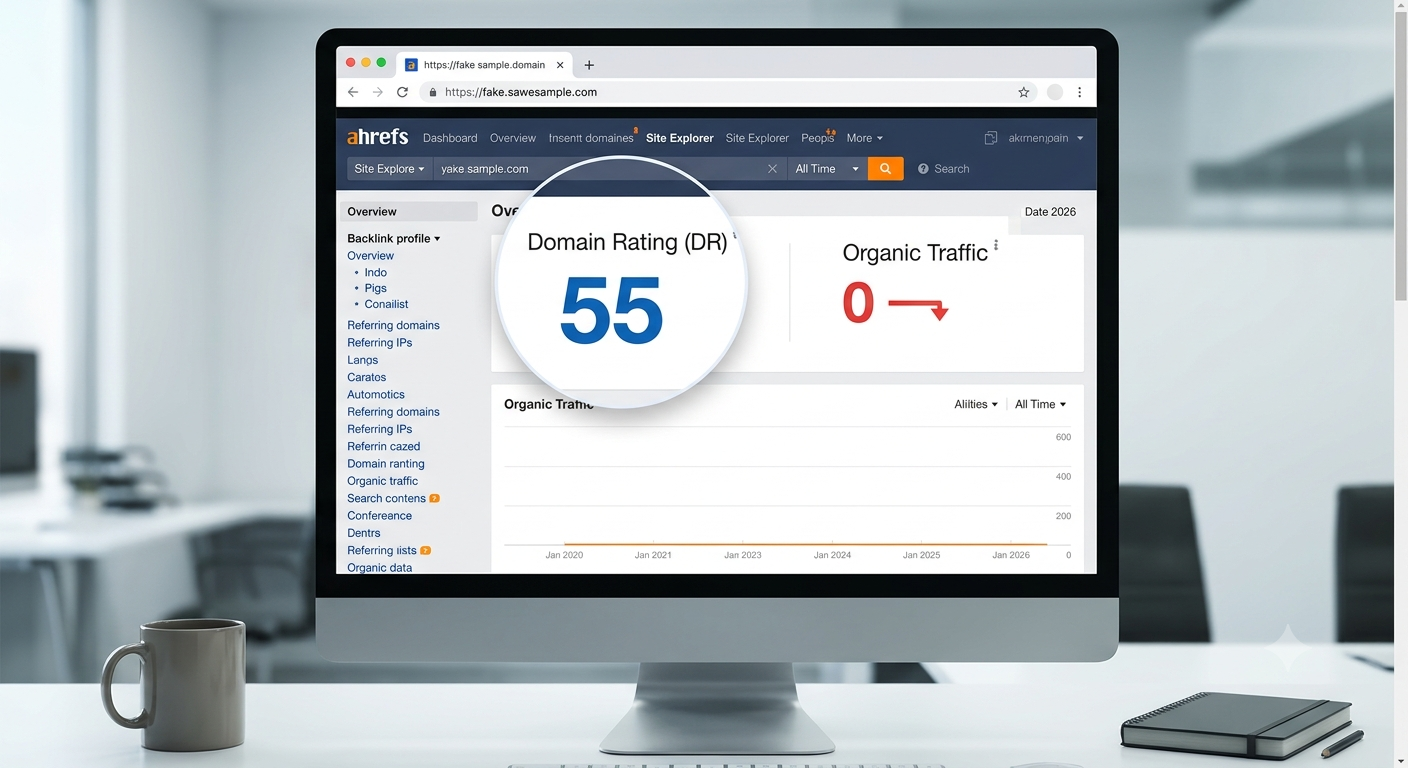
Does the site have traffic for its ranking keywords? If a site has a high DR 50 but has zero organic impressions or zero keywords ranking in the top 100, it is highly likely a PBN site built just to sell links.
-
Does the content cover multiple completely random niches? If you see an article about “best plumbing tools” sitting right next to an article about “how to buy crypto in Dubai,” that is a classic public PBN footprint.
-
Is the design a generic, out-of-the-box WordPress theme? Most network owners do not spend time customizing sites. Look for default layouts, missing About pages, or blank Privacy Policy pages.
If you answer “yes” to these questions, then the seller is using a PBN to deliver your backlinks.
Step-by-Step Guide: How to Reverse Engineer a Vendor’s Domain in Ahrefs or Semrush
Let’s look at how to run a deep dive audit on any domain a seller passes your way. Do not just take their word that a site is a “real news blog.” Fire up your SEO tools and follow these exact steps.
Step 1: Check the Historical Traffic Graph
Drop the vendor’s sample URL into the Site Explorer bar. Navigate straight to the main overview and look at the lifetime organic traffic graph.
-
The Red Flag: If you see a domain that used to have 50,000 monthly visits, suddenly dropped down to absolute zero a year ago, and now suddenly shows a tiny trickle of 50 visits, you are looking at an expired domain.
-
PBN operators buy these dead domains at auctions because the old link power is still there keeping the DR high, but the actual site is a ghost town. Real blogs do not show vertical traffic drops to zero unless they were penalized or abandoned.
Step 2: Open the “Referring IPs” Report
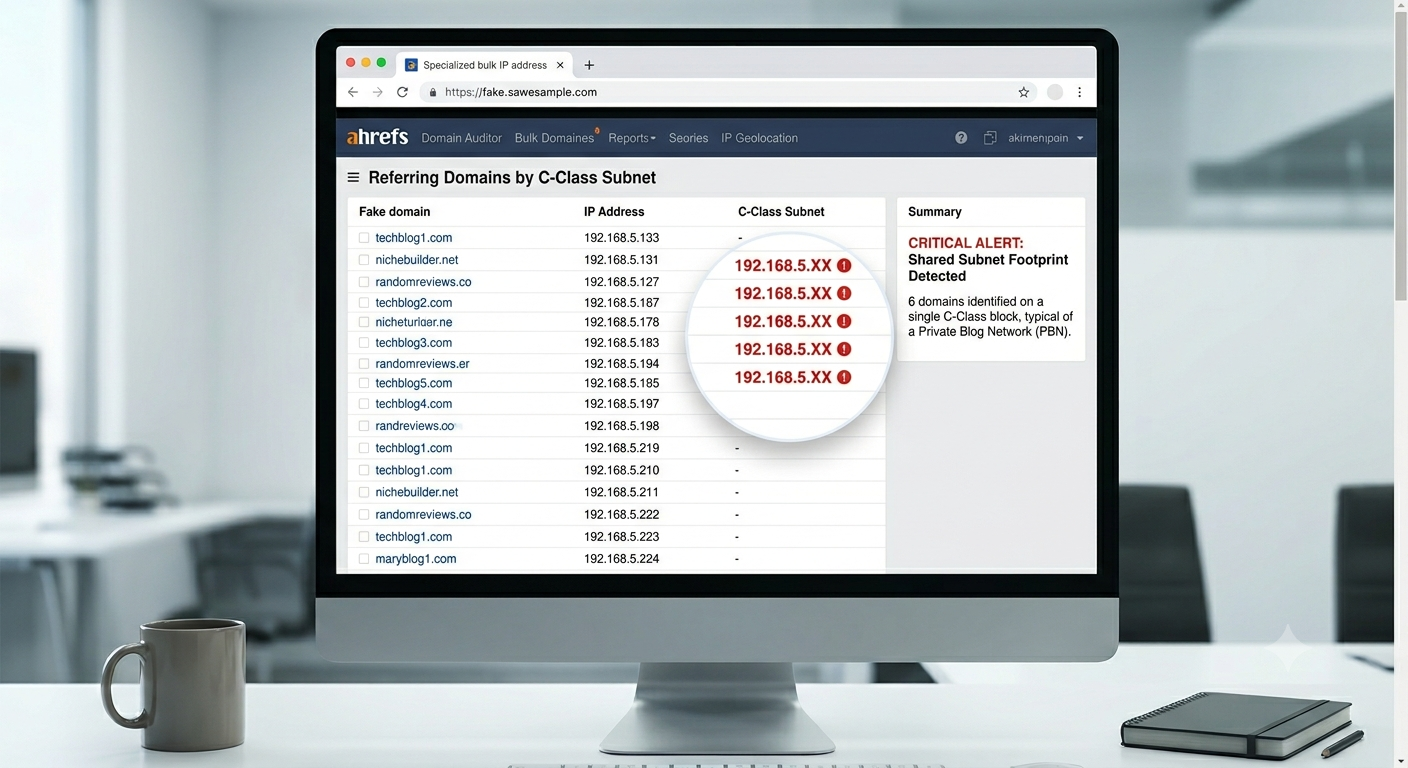
In Ahrefs, look at the left-hand menu and click on Referring IPs. This report breaks down the digital location of every single website linking to the vendor’s site.
-
In a natural backlink profile, links come from all over the world across thousands of different subnets.
-
If you notice a big cluster of referring domains sharing the exact same C-Class IP block (for example,
192.168.1.XX), it means those sites are sitting on the same server network. That is a massive server footprint that Google bot will flag instantly.
Step 3: Run the Outbound Domains Check
Click on the Linked Domains or Outbound Domains report. This shows you every single website that the vendor’s site is linking out to.
-
A real, authoritative blog links to trusted resource sites like Wikipedia, major news outlets, or top niche blogs.
-
A commercial PBN site built for selling links will show an incredibly messy outbound link profile. You will see it linking out to a casino site, a local roofing company in Texas, a crypto blog, and an ecommerce store in the UK all within the same week.
The Ultimate PBN Footprint Audit Checklist
Now that you have looked at the metrics, it is time to look at the site setup itself. Use this quick checklist to scan the actual layout of the site before buying.
Check for Full Posts on the Homepage
Look at the homepage layout of the sample site. Does it display the full, 1,000-word article for every recent post, or does it show clean snippets with a “Read More” button? PBN owners often display full posts on the homepage so that the maximum amount of link juice passes directly from the root domain to the paid anchor text link.
Review the Robots.txt File
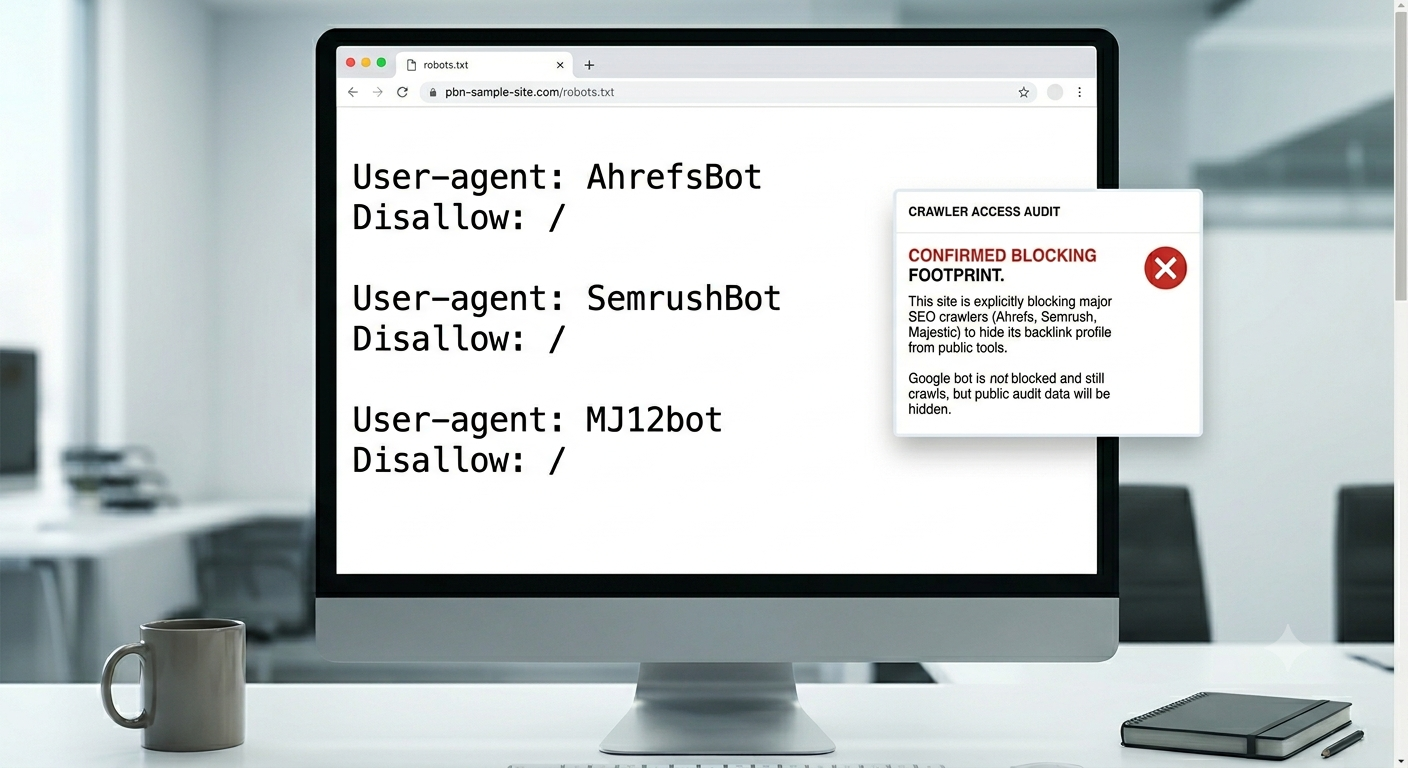
Type /robots.txt at the end of the vendor’s domain name to check their crawler directives.
Plaintext
User-agent: AhrefsBot
Disallow: /
User-agent: SemrushBot
Disallow: /
If you see lines explicitly blocking popular SEO crawlers like AhrefsBot, SemrushBot, or MJ12bot, the seller is actively trying to hide their backlink network from public tracking tools. They do this so competitors cannot trace where the paid links are coming from, but remember—Google bot ignores these blocks and sees the entire network anyway.
Inspect the Source Code for Shared ID Footprints
Right-click on the homepage of the site and click View Page Source. Hit Ctrl + F and search for codes like UA- (Google Analytics) or GTM- (Google Tag Manager). If a sloppy network owner uses the exact same tracking script ID across multiple client sites, they have handed Google the ultimate map to tie their entire network together.
What to Do If You Have Already Bought Toxic PBN Links
If you have run these audits on your existing backlink profile and realized you have already accidentally bought links from a toxic, footprint-heavy network, you need to clean it up before a manual action hits your search console.
Step 1: Request Direct Removal
Your first option is always to contact the vendor or webmaster directly. Ask them to take down the specific pages or remove your anchor text links. Most bulk vendors will comply quickly to avoid complaints.
Step 2: Format and Submit a Google Disavow File
If the seller ignores your messages or has gone completely missing, you must use the official Google Disavow Tool. Open up a clean notepad file (.txt) and list the toxic domains you want Google bot to completely ignore.
Plaintext
# Toxic PBN network links to disavow
domain:badpbndomain1.com
domain:badpbndomain2.com
Save the file as a plain text document, head over to the Google Search Console Disavow tool, select your property, and upload the file. This tells the search spider to stop counting those specific links toward your ranking algorithm.
Questions to Ask a Vendor Before You Buy
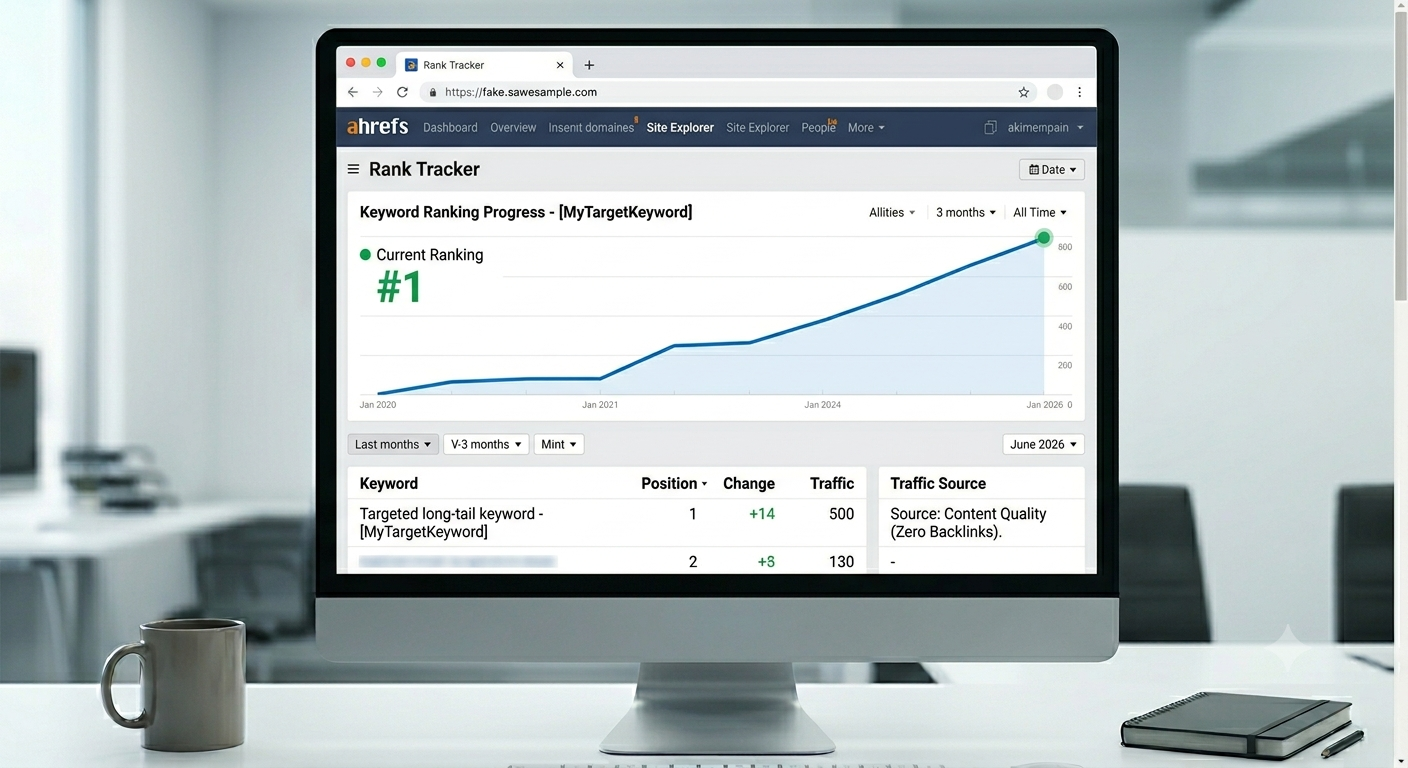
To be 100% certain about what you are buying, you can do some quick cross-examination before you start building backlinks. Send a direct message to the provider and ask them these specific questions: Can I see the exact URL where my link will be placed before you publish? (If they refuse and say it is a blind network for safety, it is a PBN). Do these sites have real organic traffic from Google search? Also, are these sites hosted on unique, independent IP addresses across different hosting providers? A transparent, professional backlinks provider will have no problem showing you real, traffic-earning sites. If they hide their domains behind a curtain, walk away.
Frequently Asked Questions About PBN Backlinks
Can Google bot detect all PBN backlinks? Google bot is incredibly smart in 2026. If a network owner leaves footprints like matching Google Analytics codes, identical plugins, or shared registrar data, Google will find it and discount the links entirely.
Is it always bad to use a PBN? If you build and control your own high-tier, closed network with zero footprints, you have control of the platforms. But when you buy public links from a vendor whose network is open to anyone, the risk of a penalty skyrockets.
What anchor text should I use if I suspect a PBN? If you are testing a newer or slightly higher-risk link vendor, do not over-optimize your exact match keywords. Use a safe anchor text mix like your full URL, your brand name, or generic phrases (like click here or go here) to keep your link profile looking natural.