
I am going to show you exactly what back button hijacking is, how to check if your website is doing it, and most importantly, how to fix it before your keyword rankings drop out of the Google SERPs.
Google has officially updated its Search Spam Policies page. They have made it 100% clear that this deceptive user experience (UX) practice will now trigger automated algorithmic demotions and manual actions.
If you want to protect your organic traffic and ensure your website remains safe from this new June 2026 update, you need to read through this guide step-by-step.
You can follow this guide for free to audit your own site and make sure your rankings stay exactly where they belong—at the top of Google.
Before we go any further you should understand the core problem.
What is Back Button Hijacking?
Back button hijacking is a deceptive practice where a website manipulates a user’s browser history to prevent them from returning to the Google search results page when they click the browser’s “Back” button.
Instead of going back to the SERPs, the user is either trapped on the same page, redirected to an unrequested page, or forced to look at an aggressive exit-intent popup.
Google bot hates this because it ruins the user experience.
When a user wants to hit the back button to check another site on the SERPs, they should be able to do it with a single click. If your site forces them to click three or four times just to escape, Google will drop your keyword rankings fast.
Some people use shady tricks like this to inflate dwell time signals instead of focusing on real authority. If you want a safe, proven way to scale your authority the right way, you should look into how to buy backlinks safely from trusted platforms rather than messing with manipulative scripts that get your site banned.
Why Google is Handing Out Manual Actions in 2026
This practice has actually been against the rules for a long time, but Google has seen a massive rise in websites abusing the loop to inflate their metrics.
When a user gets stuck in a history loop, it fakes a high “dwell time” signal. Google’s automated systems think the user loves the page because they are spending minutes on it, when in reality, they are just trying to escape.
Because this corrupts Google’s ranking signals, they have moved it into the Malicious Practices category. That is the exact same high-severity category that covers malware distribution and phishing.
The enforcement went live on June 15, 2026. If your site is caught doing this now, human reviewers will flag your domain and slap you with a manual spam action that can take months to recover from.
How to Check If Your Website is Using Back Button Hijacking
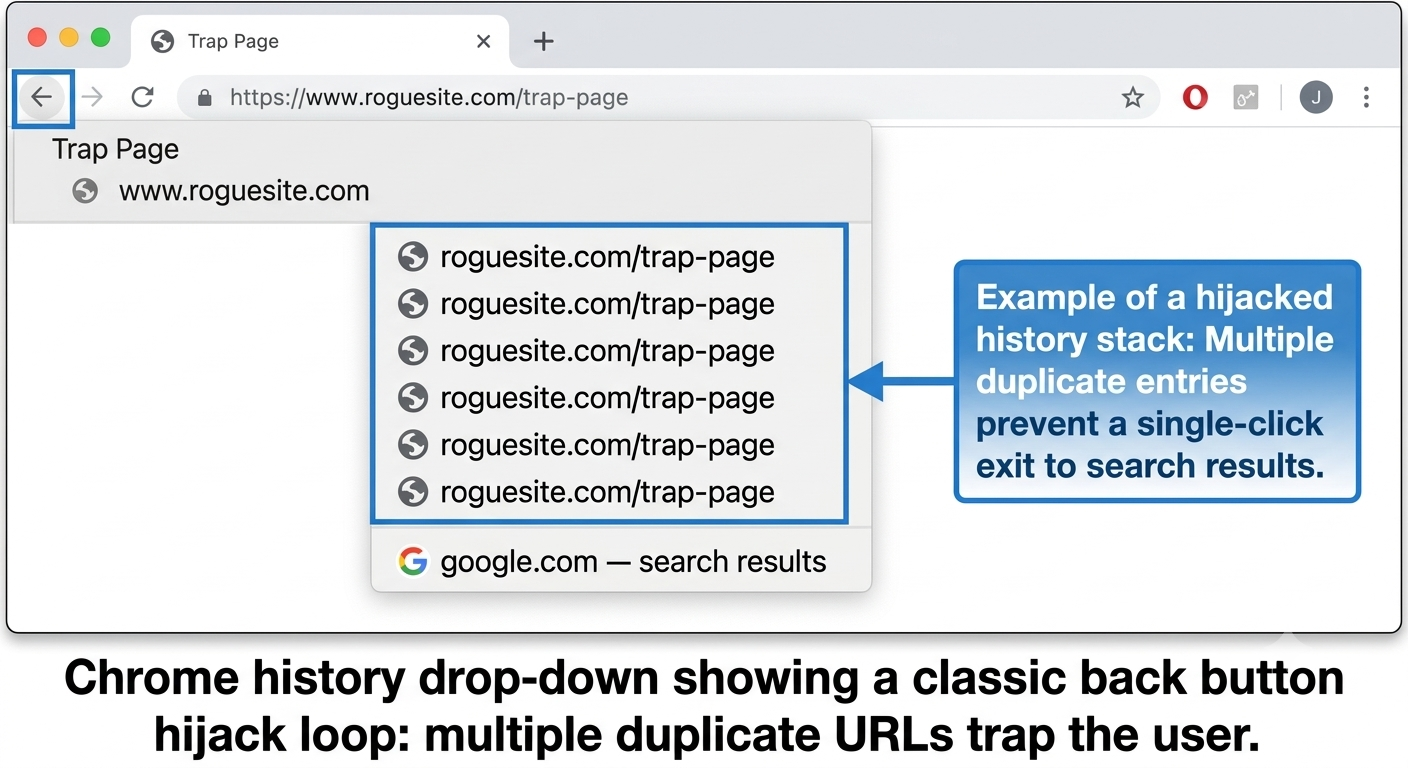
As you can see in the screenshot above, this is exactly what a hijacked history loop looks like in Google Chrome. When you right-click and hold down the back button, the script has silently forced four identical entries of the same URL into the browser’s stack. The user is trapped because hitting “Back” once just loops them onto the exact same page.
Most legitimate website owners do not do this intentionally. It usually happens because of third-party scripts, aggressive ad networks, or poorly coded WordPress plugins.
Here is a basic checklist to follow, this will ensure your website is clean and safe from this Google spam penalty:
-
Test the Manual Check: Go to Google, search for your brand name, and click on your website. Once the page fully loads, click the browser back button once. Do you go straight back to Google? If yes, you are likely safe.
-
Check the Drop-Down History: Long-click or right-click the back button in Google Chrome. Do you see your own page URL duplicated 3 or 4 times in the history list? If you see the same URL stacked up, your site is hijacking the history loop.
-
Inspect the Console: Open your browser developer tools (F12), go to the console, and look for scripts triggering JavaScript history modifiers like
pushState,replaceState, orpopstateon page load.
The Technical Culprit: How the Script Traps Users
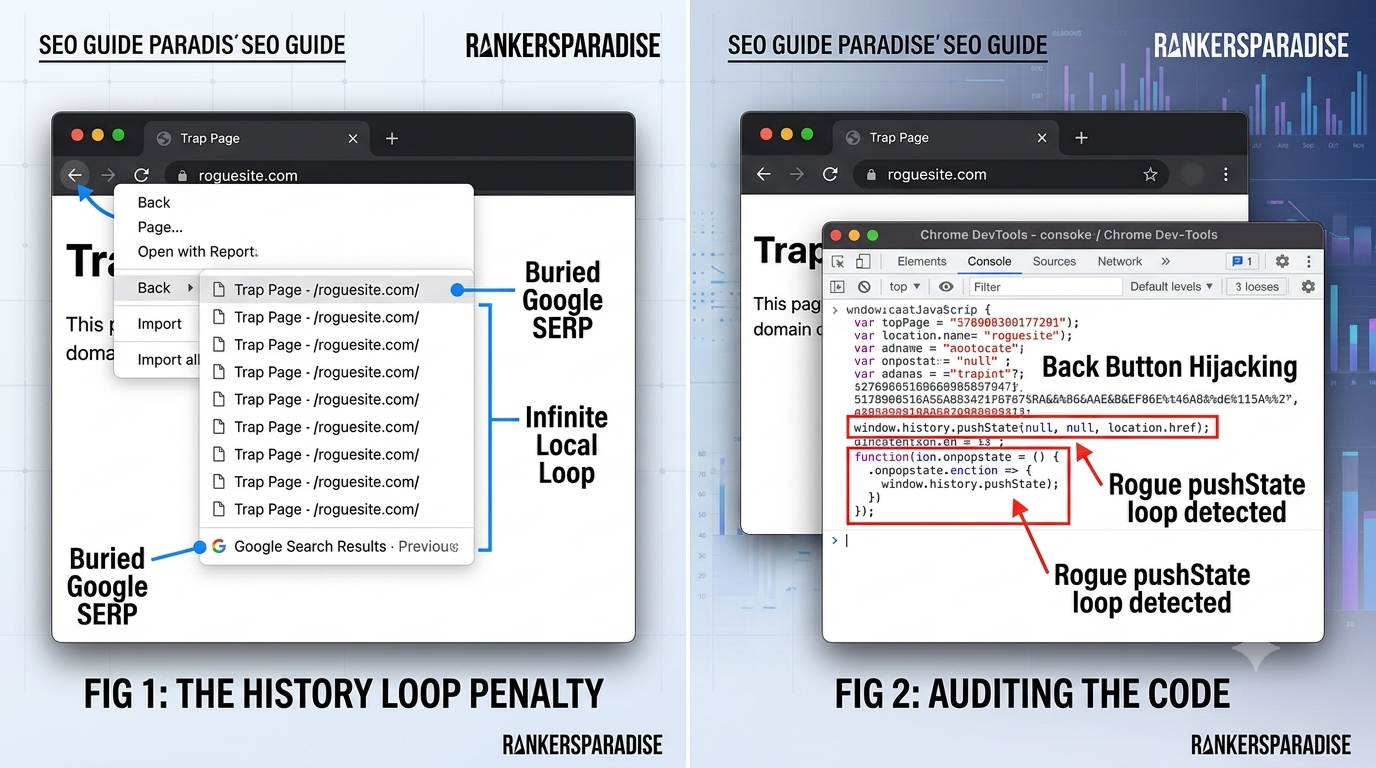
Take a close look at the image above. When you inspect the site console using F12, you can track the exact moment the rogue script fires. It abuses the history.pushState functionality to trick the browser. If you spot this signature in your site’s JavaScript imports or third-party ad widgets, you need to pull that script immediately before you get hit with a manual action.
If you are wondering how these scripts actually work, they abuse the HTML5 History API.
A rogue plugin or ad network will run a snippet of JavaScript that looks like this the exact moment a visitor lands on your site:
history.pushState(null, null, location.href);
window.onpopstate = function () {
    history.go(1);
};
This tiny script silently injects a fake entry into the browser’s history stack. When the user clicks back, the onpopstate event fires and forces the browser forward again. It creates an infinite loop that keeps the user trapped on your domain against their will.
How to Fix Back Button Hijacking Step-by-Step
If you ran the check and found that your back button is broken, do not panic. Follow these steps to fix it right now before Google bot crawls your site and issues a manual penalty.
Optimize Your Content for the June 2026 Spam Update
To make sure your content is perfectly optimized from an SEO standpoint to rank top for a target search term, always ensure your on-page SEO is 100% correct.
Make sure the keyword is in your Title tag, your H1 tag, and at least one H2 tag. Keep your overall keyword density under 1% so you do not over-optimize.
Quality written content alone is enough to rank for a low or high SEO competition keyword. If you want to accelerate your rankings even more without risky software tricks, you can use safe foundational link-building methods like creating high-authority web 2.0 backlinks to pass clean power to your news posts. You do not need to build a massive multi-tier link pyramid for a low-competition topic if your on-page optimization is done exactly like I have showed you here.
Fix your site scripts, keep your content unique, and keep your keyword rankings safe.