
If you’ve been following my work at Rankers Paradise for a while, you know I’ve spent years refining the art of the Web 2.0. From the early days of simple link wheels to the ultra-complex, multi-tier frameworks I build for my clients today, I’ve seen exactly what gets real keyword ranking results in the modern search landscape.
But there is a massive problem that almost every single SEO faces once they start winning.
You spend days researching low-competition long-tail keywords. You write flawless, highly optimized content. Then, you head out and carefully build a powerful network of contextual, high-authority web 2.0 backlinks. Within a few weeks, the strategy works perfectly—your money site shoots straight up to the #1 spot on the Google organic SERPs.
What happens next? Your competitors wake up, notice they’re losing targeted organic traffic, and instantly pull your URL. They dump it straight into commercial intelligence tools like Ahrefs or Semrush to reverse-engineer your entire off-page footprint.
Within days, they are copying your exact link building blueprint, matching your anchor text distributions, and trying to out-budget your strategy.
I am going to show you exactly how you can hide your web 2.0 backlinks from competitors, completely for free, and without needing root server access. By blocking commercial scrapers while letting Google bot pass through entirely unhindered, you can build an invisible ranking moat that no competitor can copy.
The Core Technical Challenge: Web 2.0 vs. PBNs
When you deploy a standard private blog network (PBN), hiding your backlink footprint from external software is incredibly straightforward. Because you own the hosting infrastructure and the root domains, you can simply open up your server configuration or drop a few precise lines of code directly into your .htaccess file. You tell the server to throw a 403 Forbidden or a 404 Not Found error whenever user-agents like AhrefsBot, SemrushBot, or DotBot attempt to crawl your pages.
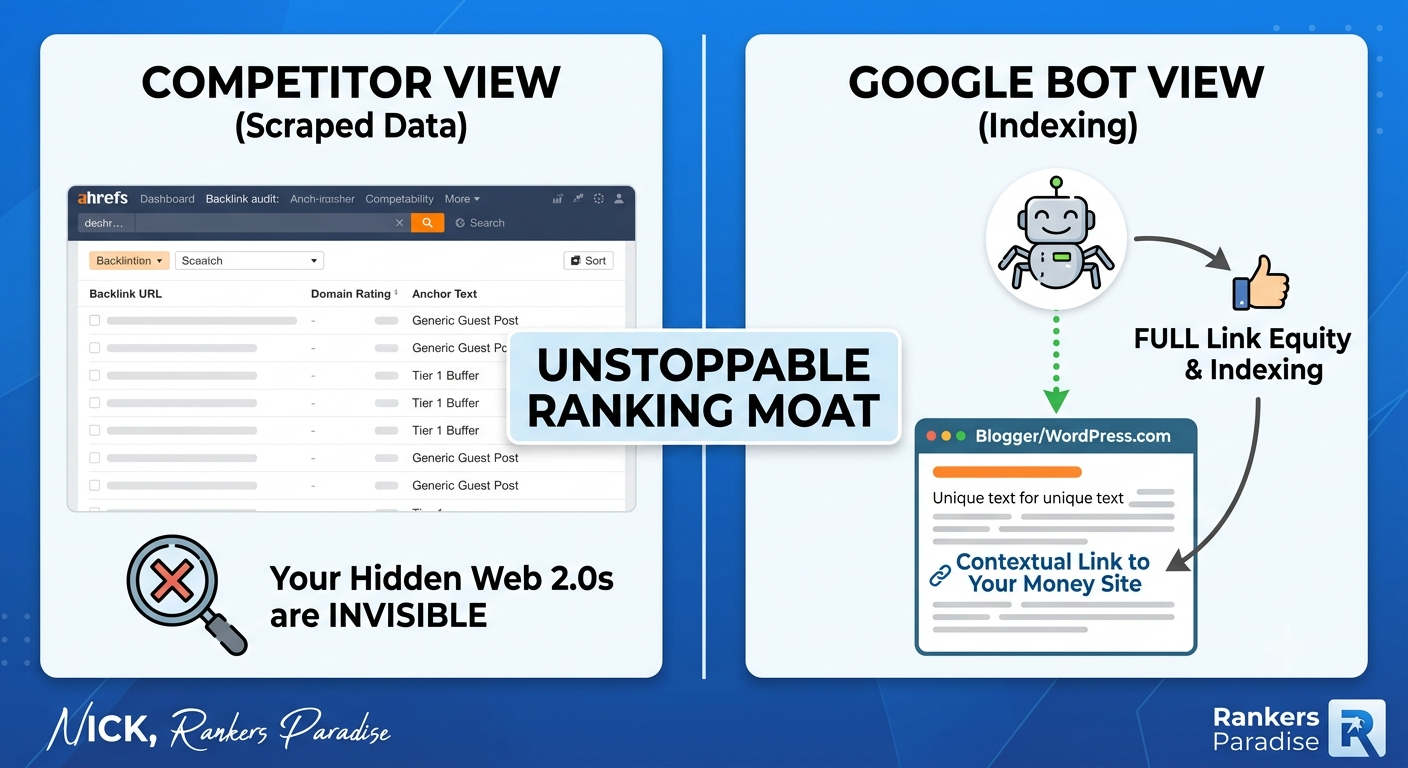
With free Web 2.0 platforms like WordPress.com, Blogger (Blogspot), Wix, Tumblr, or Weebly, you don’t have that luxury.
You do not own the root server infrastructure. You cannot access or modify the .htaccess file. By default, these high-authority subdomains are completely open books. When a competitor runs a backlink audit on your money site, those commercial scraper bots crawl the Web 2.0 blogs, log the exact contextual link placement, and hand your exact ranking blueprint right over to your competitors on a silver platter.
The Google Bot Advantage: Third-party commercial SEO crawlers operate on entirely separate server networks and use different user-agent strings than Google’s actual ranking engine. If we can manipulate how the Web 2.0 page renders based on who is asking to see it, we can feed fake data or completely blank pages to the commercial tools while letting Google bot read, cache, and credit the full link equity to your website.
The Comprehensive Blueprint to Hide Your Footprint
Since we cannot block commercial crawlers at the server level on third-party platforms, we have to leverage frontend code manipulation and architectural design to obscure our links. Here are the three advanced strategies we use to keep our client networks entirely invisible.
Step-by-Step Implementation: The Blogger JS Blocking Script
To make this completely actionable, let’s look at how to implement the JavaScript user-agent masking method on a free Blogger (.blogspot.com) sub-domain. This is the exact method that allows you to safely build out a hyper-targeted network without exposing a single contextual link to your niche rivals.
JavaScript
<script type='text/javascript'>
//<![CDATA[
document.addEventListener("DOMContentLoaded", function() {
    var botPattern = /ahrefsbot|semrushbot|dotbot|rogerbot|mj12bot|megaindex|exabot/i;
    var userAgent = navigator.userAgent;

    if (botPattern.test(userAgent)) {
        // Clear out the page content completely for commercial scrapers
        document.body.innerHTML = "<h1>404 Not Found</h1><p>The requested URL was not found on this server.</p>";
        window.location.replace("https://google.com");
    }
});
//]]>
</script>
To install this, simply log into your Blogger dashboard, head over to the Theme tab, click the dropdown menu next to “Customize,” and select Edit HTML. Find the opening <head> tag near the top of the template, paste this script directly below it, and hit save.
When an Ahrefs or Semrush bot attempts to read your post to catalog your backlink profile, it triggers the script, wipes the page content, and gets thrown away from your network. When Google bot crawls the exact same URL, it skips right past the conditional match, reads your fully optimized article, and counts the contextual link equity.
                  ┌──────────────────────────────┐
                  │  Incoming Crawler Request    │
                  └──────────────┬───────────────┘
                                 │
                                 ▼
                    [JavaScript User-Agent Check]
                                 │
                ┌────────────────┴────────────────┐
                ▼                                 ▼
      Match: Commercial Bot             Match: Googlebot
     (Ahrefs, Semrush, etc.)           (Verified Crawler)
                │                                 │
                ▼                                 ▼
   ⛔ Wipes DOM / Redirects          ✅ Renders Full Content
     (Links Kept Hidden)              (Backlink Indexed Safely)
On-Page Optimization: Ranking with Content Alone
If your goal is to claim the top spot on the organic SERPs for this long-tail keyword with pure content quality alone, you cannot afford to skimp on your on-page setup. Even if you don’t build external links to this article, strategic optimization will tell Google’s indexing spiders that your page is the single most relevant answer on the web.
Follow this exact on-page checklist inside your WordPress editor before hitting publish:
-
The Meta Target: Ensure your exact long-tail phrase—
how to hide web 2 0 backlinks from competitors—is placed at the absolute front of your Meta Title tag and within the first 120 characters of your Meta Description. -
Heading Architecture: Your main H1 heading must contain the exact keyword. Additionally, ensure you include the key phrase seamlessly inside at least one H2 sub-heading.
-
Keyword Density Constraints: Keep your exact keyword density below 1%. Modern semantic search relies heavily on entity salience, not keyword stuffing. Mention the core phrase at the top, middle, and bottom of your guide naturally, and let semantic variations do the rest of the heavy lifting.
-
Image ALT Optimization: Upload a relevant, high-contrast infographic or structural layout diagram to your post. Ensure the primary target keyword is set as the official Image ALT text string.
For my own digital assets, the absolute moment an article goes live, I bypass standard crawling delays entirely by running the URL directly through the Rank Math Instant Indexing API plugin for WordPress. This forces an immediate Google bot crawl, getting your optimized content registered into the live search index within a matter of minutes.
Mastering Your Anchor Text Ratios
If you are expanding your strategy to safely buy backlinks or build out secondary tiers to push this article even higher, you need to understand how to structure your anchor text profile. Over-optimizing your anchors is the number one reason why new websites fail to break out of the Google sandbox.
When you are sending authority down into your hidden Web 2.0 tiers or pushing power directly to your money site, stick to a highly diversified distribution profile:
| Anchor Text Style | Strategic Purpose | Distribution Allocation |
| Naked URLs | [https://rankersparadise.com/](https://rankersparadise.com/) |
40% of your link profile |
| Brand Variations | Rankers Paradise / Nick Rankers |
35% of your link profile |
| Page Titles | How to Hide Web 2 0 Backlinks from Competitors |
15% of your link profile |
| Exact Match Target | how to hide web 2 0 backlinks from competitors |
10% or less (Max 1 in 10 links) |
By prioritizing clean, brand-heavy anchor distributions and maintaining strict on-page semantic relevance within your text, you give Google’s core algorithm exactly what it wants to see: a natural, safe, and authoritative contextual profile.
Nick’s Advanced Takeaway: True search engine optimization isn’t just about knowing how to climb to the top of page one; it’s about knowing how to stay there once you arrive. By taking the extra few minutes to inject client-side user-agent masks and structuring your networks with smart multi-tier buffers, you completely strip away your competitors’ ability to copy your plays. Work smart, mask your footprints, and keep your ranking blueprints private.