
I am going to show you exactly how you can optimize your website for Google AI Overviews and get massive traffic from organic search. I show you the exact content optimization steps that remain permanently effective and, most importantly, get good keyword ranking results.
To prove that you can rank at the top of Google using these strategies, I will also break down the direct layout steps you can follow yourself. Scroll down to see the step-by-step framework to get your content pulled straight into the AI Overview box.
You can follow this guide step-by-step for free to rank your website for any keyword in the Google SERPs and capture AI traffic.
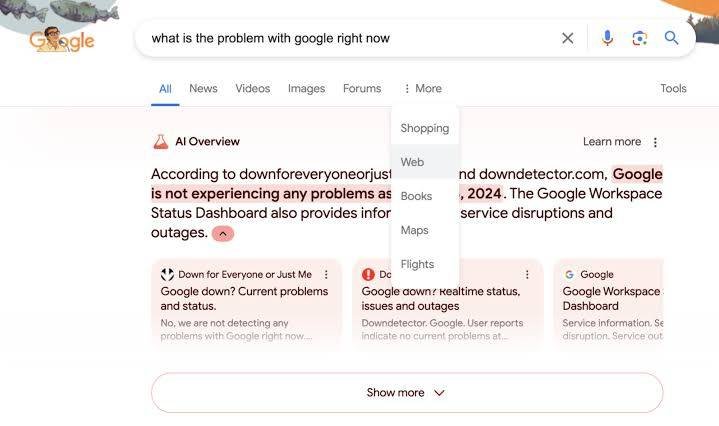
Before we go any further, you should understand: What are Google AI Overviews?
The Information Island (Direct Answer): Google AI Overviews are generative AI summaries displayed at the top of Google SERPs. They use Retrieval-Augmented Generation (RAG) to synthesize information from multiple web sources. To optimize for Google AI Overviews, websites must provide direct, fluff-free answers, utilize structured data, implement clear Markdown tables, and build niche-relevant topical authority.
Using these optimization strategies ensures your site doesn’t get left behind. When you know How to Optimize for Google AI Overviews, you can use it as your everyday ranking SEO strategy. You have control over your content, and you can structure it exactly how the Google bot and AI crawlers want to see it.
Before you go ahead and get your optimization in place, you need to set up your page structure properly. When you know how to do this strategy, you can rank any website in the SERPs for free.
Table of Contents
Table of Contents
How To Optimize Your Content Structure for AI Overviews
Before I show you the best layout formats, you must make sure your content is designed to be easily read by LLM (Large Language Model) crawlers. The whole of this ranking strategy is completely free and relies purely on top-tier quality execution.
To check if you are doing things right, you need to answer “yes” to these core structural questions:
-
Do you have a clear, direct answer to the target keyword right at the top of the page?
-
Is your data organized into scannable lists and Markdown tables?
-
Are you using clear, authoritative entity names rather than vague pronouns?
If you answer “no” to these questions, then your content is going to be more difficult to pull into the AI citations. If you answer “yes,” then it is highly likely that you will dominate the organic results and secure the primary citation links.
To really get the best results, you need a solid foundation. If your site lacks authority, the AI bots won’t even look at your content to use as a source. That’s why you need to build up your domain authority first. A great way to do this for free is to follow my guide on how to build web 2.0 backlinks step-by-step. These high-authority platforms give your site the trust signals Google’s AI engine looks for when pulling citations.
Step-by-Step AI Overview Content Checklist
Now that you know what it takes, it is time to write and optimize your content. Here is a basic checklist to follow; this will ensure your content is optimized and ready to rank #1 on Google:
-
Ensure the exact keyword is in the META DATA: Title Tag and Description Tag.
-
Ensure the Keyword is in the H1 TAG: Exactly like our title: How to Optimize for Google AI Overviews.
-
Ensure the keyword is in one H2 TAG.
-
Ensure the keyword is mentioned naturally at the top, middle, and bottom of the content.
-
Add an “Information Island”: A 40-to-60-word paragraph that gives a direct definition of the search query without fluff.
Here is the secret: Google’s AI doesn’t just look at text; it looks at how trustworthy your entire digital footprint is. If you want to speed up your rankings and establish immediate authority in competitive niches, it is often best to buy backlinks from a trusted provider. Having high-quality contextual links pointing to your optimized structure makes Google trust your data points above everyone else.
Do not over-optimize your content. Keep your main keyword density under 1%. If you are unsure about anything at all, look at the top-ranking websites for your niche. They are at the top for a reason.
If your website is on WordPress, you can use a plugin like Rank Math or Yoast to assess your basic on-page content optimization for you. Get the green lights, and you know your foundation is solid. You should also keep an eye on official updates via the Google Search Central Blog to see whenever they change how AI features display in the SERPs.
The 3 Core Ranking Mechanics of Google’s AI Engine
To manipulate the AI Overviews to your advantage, you have to understand how the underlying technology actually pulls data. Google doesn’t just look for keywords anymore. It uses three core computational steps to build an AI Overview response:
1. Retrieval-Augmented Generation (RAG)
When a user types a complex question, Google’s AI doesn’t know the answer off the top of its head. Instead, it runs a lightning-fast background search to retrieve the top 10 to 20 organic web pages that contain relevant data. Then, it uses its LLM to summarize those pages. If your page isn’t in that initial retrieval pool, you have a 0% chance of getting cited.
2. Entity Mapping and Semantic Closeness
Google builds a massive graph of “entities” (real-world people, concepts, places, and things). When writing your article, avoid lazy writing. Do not say, “This tool helps you do it fast.” Say, “The Rank Math Instant Indexing API allows the Googlebot spider to discover new URLs instantly.” The clearer your entities are, the easier it is for the AI engine to map your content to the user’s query intent.
3. Trust Verification (EEAT)
Google’s AI engine has a massive safety guardrail. It checks the information it finds against known facts across the web. If your content makes wild, unverified claims, the system rejects it to avoid “hallucinations.” Backing up your statements with cold, hard data points is the fastest way to get verified as a trusted source.
Advanced Formatting Hacks for LLM Spiders
Let’s look at the exact layouts you need to use inside your posts. The way you format your content tells the AI bot exactly how to display it in the SERP box.
The Paragraph Emphatic Technique
When explaining a concept, put the core takeaway in bold font right at the beginning of the section. LLM scrapers scan for bold tags to extract quick definitions.
Unordered List Clusters
If you are explaining a process or a checklist, use clean Markdown bullet points. Do not use custom emojis or complex icons that break the code structure. Keep it simple so the scraper can pull your list directly into an AI list-snippet.
The Structured Data Map
Always pair your on-page text with clean JSON-LD Schema markup. If you include answers to common industry questions, use FAQPage schema. If you are breaking down a technical tutorial, implement TechArticle schema. This gives the crawler a direct map of your data before it even reads the page copy.
The Exact JSON-LD Schema to Paste Into WordPress
To guarantee the Google bot completely understands your structural context, you should inject custom JSON-LD schema into your headers. If you use WordPress, you can drop this code directly into a HTML/Code block or use a header injection plugin.
Here is the exact code block template optimized for AI Overview data ingestion:
JSON
{
  "@context": "https://schema.org",
  "@type": "TechArticle",
  "headline": "How to Optimize for Google AI Overviews: #1 Organic SERP Strategy",
  "description": "A complete step-by-step optimization framework to get your website content indexed, crawled, and cited within Google AI Overviews organically.",
  "inLanguage": "en-US",
  "mainEntityOfPage": {
    "@type": "WebPage",
    "@id": "https://rankersparadise.com/how-to-optimize-for-google-ai-overviews/"
  },
  "author": {
    "@type": "Person",
    "name": "Nick",
    "jobTitle": "SEO Specialist",
    "worksFor": {
      "@type": "Organization",
      "name": "Rankers Paradise",
      "url": "https://rankersparadise.com"
    }
  },
  "publisher": {
    "@type": "Organization",
    "name": "Rankers Paradise",
    "logo": {
      "@type": "ImageObject",
      "url": "https://rankersparadise.com/wp-content/uploads/logo.png"
    }
  }
}
Make sure you replace the example URLs with your actual post link before pushing the update live. This simple piece of code forces the algorithm to recognize your specific entities immediately.
Troubleshooting: What to Do If Your AI Citations Drop
Sometimes you will capture a highly lucrative AI Overview spot, only to see it disappear a week later. Do not panic. The algorithmic layout changes frequently as Google runs updates. Here is my exact troubleshooting sequence to win back your traffic:
1. Check for Semantic Content Decay
Go look at the competing pages that replaced you. Did they include newer data points, fresher statistics, or a cleaner table format? If yes, expand your sections. Add more specific, highly detailed answers to your H2 blocks.
2. Verify URL Accessibility and Rendering
Ensure your site didn’t develop technical crawl errors. Run your URL through the Search Console Inspection tool to ensure Google bot isn’t hitting rendering blockages caused by bad javascript or slow hosting responses.
3. Boost Niche-Relevant Trust Signals
If your content optimization is flawless but you still lost the spot, it means the algorithm shifted its trust thresholds. You need more topical authority weight. Build out secondary support articles targeting long-tail variations of your primary topic and link them back to this main pillar page using descriptive anchor text.
How to Force Google Bot to Crawl and Index Your New Content Fast
To get our content crawled by Google bot and indexed into the SERPs instantly so the AI systems can read it, we use the Rank Math Instant Indexing Plugin for WordPress.
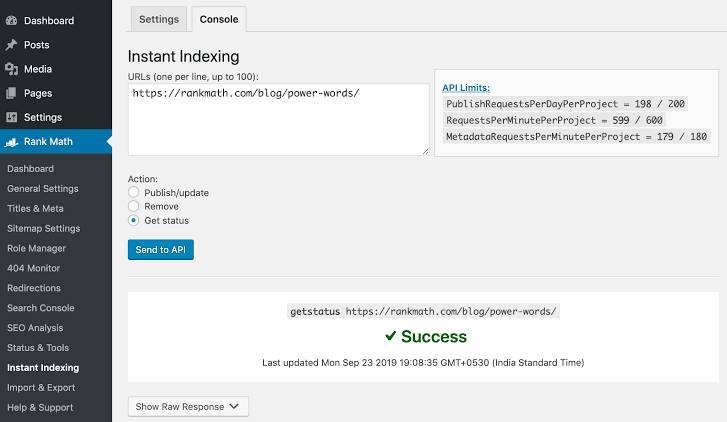
When you have installed and activated the plugin, you just need to drop the URL for your new content into the instant indexing box:
https://rankersparadise.com/how-to-optimize-for-google-ai-overviews/
Then you just need to hit the “Send to API” button. This will ensure Google bot crawls and indexes the new content on your website immediately. Once Google indexes the page, its AI indexing engine will evaluate the semantic relevance of your text.
If you want to test how well Google’s official tools see your structured data assets, make sure to run your page through the Google Rich Results Test tool to verify everything is perfectly mapped.
Traditional SEO vs. AI Overview Optimization (GEO)
To be 100% certain about how to adjust your writing, you must understand the difference between classic rankings and Generative Engine Optimization (GEO).
| Optimization Factor | Traditional SEO | AI Overview Optimization (GEO) |
| Primary Metric | Keyword Density & Backlinks | Semantic Completeness & Structure |
| Formatting Requirement | Standard Paragraphs | Tables, Bullet Lists, Direct Q&A |
| Crawl Focus | Search Spiders (Googlebot) | LLM Extractors & Retrieval Systems |
| Anchor Text Need | Heavy Exact/Partial Match | High-Authority Citation Linking |
| User Interaction | CTR Focus on Meta Titles | Direct Answer Attribution & Clicks |
| Algorithmic Risk | Standard Rank Shifts | Core Attribution Drops & Hallucination Filters |
Make sure you mix up the text and formatting layout that you use on your site. If your content is structured like I have shown you here, it will rank top for the search term and win those massive traffic-driving AI citations easily.
Follow this guide step-by-step, update your key posts, and watch your organic traffic scale!